WinForms on macOS
Why plain WinForms can’t do it
System.Windows.Forms lives in the Windows Desktop runtime and wraps user32.dll and GDI+. There
is no macOS build of it and never has been — a net10.0-windows project won’t even build on a Mac.
The usual workarounds don’t hold up either: Mono’s WinForms port never made it into modern .NET,
System.Drawing.Common throws PlatformNotSupportedException off Windows as of .NET 7, and running
the app under a Windows VM or CrossOver means you are still shipping a Windows app.
What Majorsilence.Forms does instead
It reimplements the WinForms API on SkiaSharp and hosts it in a real NSWindow through Avalonia. A
plain net10.0 build — no -windows TFM — produces an app that launches natively on Apple
Silicon (arm64) and Intel (x64) Macs.
dotnet new install Majorsilence.Forms.Templates
dotnet new majorsilenceforms
dotnet run --project MajorsilenceFormsApp
The template produces a shared UI library plus a desktop head; the same source builds unchanged on Windows and Linux.
What actually works on macOS
| Area | On macOS |
|---|---|
| Windowing and input | Native NSWindow via the Avalonia backend, with the standard macOS traffic-light chrome and native drag/resize |
| Apple Silicon | Native arm64 — osx-arm64 and osx-x64 are both normal publish targets |
| Rendering, Retina | SkiaSharp, GPU-accelerated and HiDPI-aware — the same paint code as Windows and Linux |
| Fonts and text | Resolved through CoreText by SkiaSharp, with a bundled fallback set for anything missing |
GDI+ / System.Drawing code |
Replaced by Majorsilence.Forms.Drawing — Bitmap, Font, Pen, Brush, Region, Drawing2D, Imaging, EMF/WMF playback |
| Common dialogs | Native open/save/folder/colour/font dialogs through the backend |
| Printing | PrintDocument renders through Skia to PDF, identically on every OS |
| WebView controls | Real WKWebView, including inline PDF rendering |
| Sound | Played through afplay |
| Secure storage and speech | Majorsilence.Forms.Essentials: SecureStorage writes to Keychain Services, Speech uses the system say voice; both report IsSupported and degrade to no-ops rather than throwing |
| Themes and dark mode | Themes are CSS files (a documented subset); BuiltInTheme.Default follows the OS light/dark appearance, and Theme.SetBuiltInTheme/Theme.ApplyTheme switch at runtime. The Theme Studio sample is a live CSS editor with preview, and prebuilt binaries are attached to GitHub Releases |
| Trackpad gestures | Pinch, Swipe, LongPress and momentum ScrollGesture are first-class events; ScrollableControl already applies them, so Panel/ListBox/TreeView pan with no app changes |
| Native window handle | A real NSWindow pointer via WindowBase.PlatformHandle (per-control handles are IntPtr.Zero everywhere — see Native interop) |
| Uno backend | Also supported and verified booting and rendering a full form on macOS, if you’d rather host in Uno |
| GTK 4 backend | Compiles and runs on macOS with the GTK runtime from Homebrew (brew install gtk4) — a Linux-first backend, so expect a GTK window rather than an AppKit one; useful mainly for testing the GTK head on a Mac |
Where it will feel un-Mac-like
Worth knowing before a design review, because these are consequences of the compatibility model rather than bugs:
- The menu bar is in the window.
MenuStripis a real top-docked bar inside the form, the way WinForms draws it — it is not projected onto the macOS global menu bar at the top of the screen. - Controls are drawn, not native. A
Buttonis Skia paint code themed by the framework, so it matches your app on Windows and Linux rather than matching AppKit. Consistency across platforms and native look on each are genuinely opposed goals; this project picks the first. CSS theming lets you get close to a Mac palette and typography, but it is still your theme, not AppKit’s. - Windows conventions travel with the code. Keyboard shortcuts, dialog button ordering and window-close semantics come from your existing WinForms design. Adapting them to macOS habits is app-level work.
- No UI Automation bridge. Screen-reader support (
Majorsilence.Forms.WindowsUIAutomation) is Windows-only today; anNSAccessibilitybridge is roadmap, not wired. The backend-neutral automation tree still drives tests, Selenium and the MCP server on macOS.
Shipping a .app
Packaging is the same as for any Avalonia or .NET desktop application — the framework adds no extra steps:
dotnet publish -c Release -r osx-arm64 --self-contained
From there, the standard macOS chores apply: wrap the published output in a
YourApp.app/Contents/MacOS bundle layout with an Info.plist and an .icns, then codesign it,
and notarize it with Apple if you distribute outside the App Store. Build a universal binary by
publishing osx-arm64 and osx-x64 and joining them with lipo.
Verified on macOS
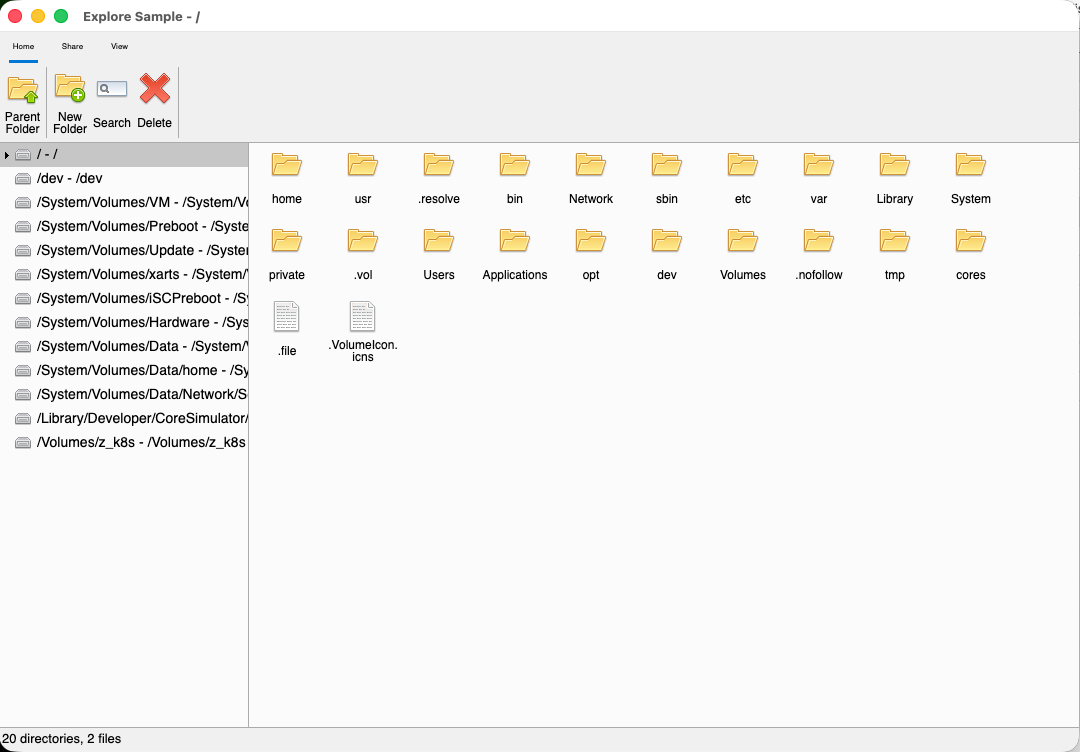
The Explorer sample and the full control gallery both run on
macOS, and the Uno head of the gallery has been verified there too:
Next
- Getting started — first app, from a template or scratch.
- Migrate an existing WinForms app — the automated rewrite.
- WinForms on Linux — the same story on Ubuntu, Fedora and Debian.
- Cross-platform WinForms — the architecture and its trade-offs.