Training guide
This is the guide to hand a development team that is about to build — or migrate — an application on Majorsilence.Forms. It assumes WinForms experience and nothing else.
It is deliberately scoped to using the framework: referencing the packages, writing forms, moving a legacy codebase over, choosing your targets, testing what you built, and shipping it. It is not a contributor guide — you never need to clone or build the framework itself to follow any of it. (If you do end up wanting to fix something in the framework, module 10 points you at the one paragraph that matters.)
Every code example appears in both C# and VB.NET. The C# examples in the original edition were
compiled and run on macOS before publishing — the screenshots throughout are those runs, not mock-ups,
and two of the honest caveats you’ll read below were found by running them. The examples added in the
October 2026 revision (theming, MVVM, async dialogs, the newer backends, animation frames, custom
automation state) were checked against the repository’s own documentation and samples rather than run
for this guide, and are marked as such where it matters. VB is a first-class migration target here: the
migrator handles .vbproj/.vb files, re-injects the constructor the classic VB compiler used to
supply, and generates a My.Resources accessor. Three VB-specific caveats are called out where they
land — --dual-build is C#-only, My.* is only partly
implemented, and VB has no module initializer for test
setup.
Two ways to use it:
| Format | How | Modules |
|---|---|---|
| Two-day workshop | Day 1: modules 0–4 (model, first app, knowing what works, drawing). Day 2: modules 5–10 (migration, targets, interop, testing, native content, shipping). | all |
| Self-paced | Modules 0–3 are the mandatory core — nobody should start a migration without them. Then take 5 if you’re migrating, or 6 + 8 if you’re building something new. Appendices D and E (theming, MVVM helpers) are optional reading for whoever owns the look and the view-model wiring. | pick |
Two things to accept up front, because they shape every decision below. Majorsilence.Forms is beta: the API is stabilizing, and not every WinForms corner is covered — so pin your package version. And it is compile-and-approximate, not pixel-perfect: migrated code is designed to compile and run, with some members deliberately doing nothing yet. Module 3 is entirely about how to tell which is which, and it is the module that most repays a slow read.
Contents
- Module 0 — Get something running
- Module 1 — The mental model: self-drawn controls on a swappable host
- Module 2 — Your first app
- Module 3 — Knowing what works before you build on it
- Module 4 — Drawing and custom paint
- Module 5 — Migrating your WinForms app
- Module 6 — Choosing your targets
- Module 7 — Incremental adoption on Windows
- Module 8 — Testing your app
- Module 9 — Native content and video
- Module 10 — Shipping: CI, versioning, staying current
- Appendix A — Troubleshooting by symptom
- Appendix B — Rollout plan for a real codebase
- Appendix C — Reference card
- Appendix D — Theming your app with CSS
- Appendix E — MVVM helpers
Module 0 — Get something running
Outcome: every developer has an app of their own running on their own OS, and knows where to look up “can this framework do X”.
All you need is the .NET 10 SDK. No Windows, no Visual Studio, no platform workloads, and no framework source.
dotnet new install Majorsilence.Forms.Templates
dotnet new majorsilenceforms
dotnet run --project MajorsilenceFormsApp
That’s a running cross-platform app. Note the shape of what was scaffolded, because it is the shape to
keep: a solution with two projects — MajorsilenceFormsApp.Shared, a plain class library holding
MainForm and its Designer file, and MajorsilenceFormsApp, a thin desktop head on the Avalonia
backend. Your forms live in the shared library; a head is just an entry point plus a backend. That is
what lets the same UI later run on a phone or in a browser by adding another head rather than
touching the forms (module 6):
dotnet new majorsilenceforms -n MyApp --IncludeAndroid --IncludeWasm --IncludeiOS
Each switch adds one head project and needs its workload (android, wasm-tools, ios — the last on
a Mac only); all three default to off, so the plain command builds with no extra workload installed.
--msformsVersion and --avaloniaVersion pin the package versions the scaffold references.
Now the reference material.
Your API documentation is the control gallery. There is no standalone API reference yet, so the
fastest answer to “does TreeView support X” is the gallery — one demo panel per built-in control. The
quickest look costs nothing: the live browser gallery is the real
framework compiled to WebAssembly, no install required.
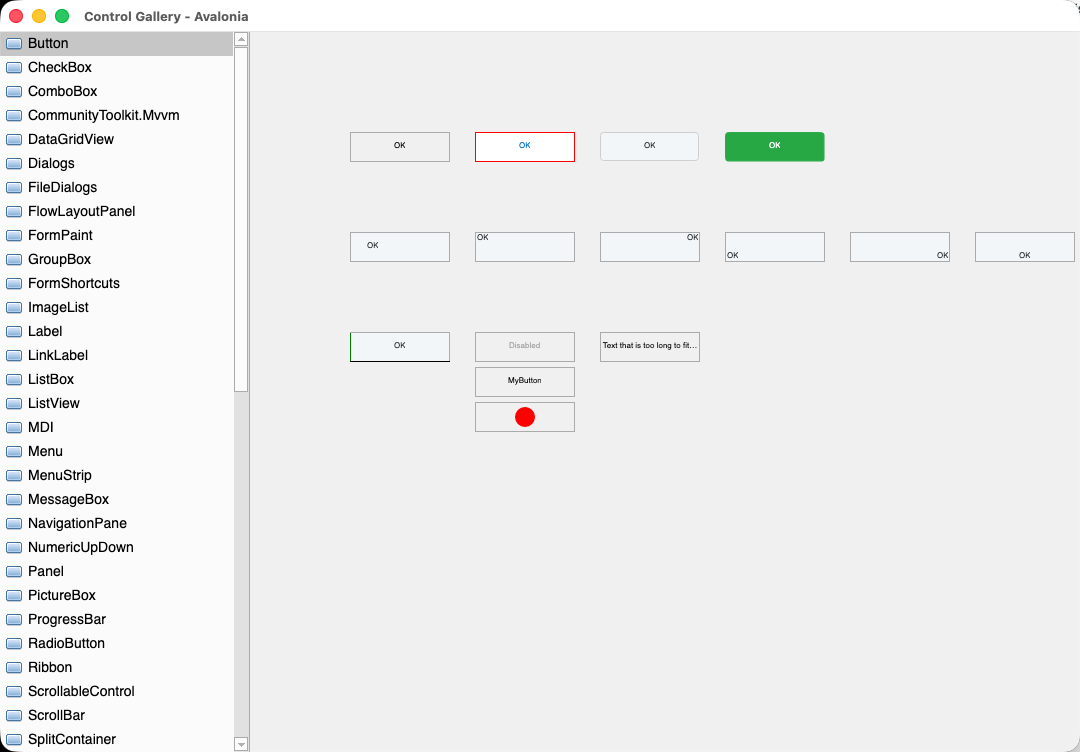
ControlGallery on macOS 26, Avalonia backend, Button panel selected. Note what is and isn’t the
framework’s: the traffic-light caption is the OS’s, and every pixel below it — the nav tree, its
scrollbar, the button variants — is drawn by Majorsilence.Forms through Skia.
When you need to read the code behind a control rather than just look at it, clone the repository for
its samples/ folder and run what you want to study:
git clone https://github.com/majorsilence/Majorsilence.Forms.git
dotnet run --project samples/Gallery.Avalonia   # the gallery, on the desktop backend
dotnet run --project samples/Explorer           # a Windows Explorer clone
dotnet run --project samples/Outlaw             # an Outlook clone
Run samples with
dotnet run --project …, or from the build output directory — not from the repo root. Each sample loads icons through a relative path (ImageLoaderuses"Images"), which resolves against the process working directory, not the assembly location. Launch the built executable from anywhere else and every icon file misses — andBitmap(string)degrades to a 1×1 placeholder rather than throwing, so the app boots cleanly, logs nothing, and renders with every icon invisible.Worth doing once on purpose, because your own app inherits this behavior. The fix in your code is to resolve assets against the assembly location:
C#
using Majorsilence.Forms.Drawing;

static readonly string ImageRoot =
    Path.Combine (AppContext.BaseDirectory, "Images");

public static Bitmap Load (string fileName)
    => new Bitmap (Path.Combine (ImageRoot, fileName));
VB.NET
Imports System.IO
Imports Majorsilence.Forms.Drawing

Private Shared ReadOnly ImageRoot As String =
    Path.Combine(AppContext.BaseDirectory, "Images")

Public Shared Function Load(fileName As String) As Bitmap
    Return New Bitmap(Path.Combine(ImageRoot, fileName))
End Function
It is the silent-no-op failure mode in miniature, and meeting it on a sample you know works is much cheaper than meeting it for the first time in production.
Exercise 0. Create the template app, run it, and add a Button that shows a MessageBox. Then
open the live gallery and find three controls your own application depends on.
Module 1 — The mental model: self-drawn controls on a swappable host
Outcome: you can predict which WinForms idioms carry over untouched, which behave differently, and which cannot work at all — from first principles rather than by looking things up.
There is one architectural fact, and almost everything else follows from it:
Majorsilence.Forms does all of its own drawing with SkiaSharp. The windowing toolkit underneath is only a host.
        Your app  (Forms, controls, Designer files — the WinForms model you know)
            │
       Majorsilence.Forms  (controls + WinForms-compatible API, drawn with SkiaSharp)
            │
   Swappable host backend
   ├─ Avalonia   → Windows · macOS · Linux  (default)  · also Android · iOS · Browser
   ├─ Uno        → desktop · iOS · Android · WebAssembly
   ├─ GTK 4      → Linux first (real Gtk.Window); Windows/macOS with the GTK runtime
   ├─ Terminal   → a console (Kitty graphics / Sixel / Unicode blocks) — single-view, like a phone
   ├─ WinForms   → Windows only; real System.Windows.Forms windows — a *migration* backend
   ├─ WPF        → Windows only; a real WPF Window — the same migration idea
   └─ Headless   → offscreen rendering for tests / CI
Seven backends, one set of forms. The two Windows-only ones exist for one purpose — letting a WinForms
or WPF app adopt Majorsilence.Forms one control at a time (module 7) — and the Terminal
one is the proof that the host really is interchangeable: nothing in your form knows whether it is being
presented through a GPU swapchain or a ▄ character.
Every control paints into a Skia canvas. The host underneath creates native windows, runs the message
loop, delivers input, and presents the rendered surface — and that’s all it does. The core package
references no windowing toolkit whatsoever; the backend you reference supplies one. For you as an app
developer that seam has exactly two practical consequences: one line in your project file picks your
host (module 6), and no toolkit type ever appears in your code — you write against
Form, Control, MouseButtons, Keys and System.Drawing value types, the same as WinForms.
What follows from it
This table is the payoff of the module. Everything in it is a behavioral difference you can reason your way to, rather than memorize.
| Because drawing is the framework’s and windows are the host’s… | So… |
|---|---|
| One native OS window per top-level window; everything inside it is painted | Control.Handle is IntPtr.Zero. There is no OS object behind a Button to report. See module 9. |
WindowBase.Handle still has to satisfy the WinForms “touch .Handle to force creation” idiom |
It returns an opaque nonzero token — not an HWND. Never hand it to native code. WindowBase.PlatformHandle is the genuine article — real on the Avalonia backend (HWND/NSWindow/XID) and on the WinForms backend (a real HWND); zero elsewhere. |
| The framework scales its own canvas to the display | Everything you see on a Control is in logical units — Width/Height/Bounds, MouseEventArgs, and (since 2026-10-01) ClientRectangle, ClientSize and the paint canvas too. Ordinary WinForms layout and paint code is the right size at any scaling with no changes. Device pixels are opt-in (ScaledBounds, PaintEventArgs.Scaling, LogicalToDeviceUnits). The one exception: owner-draw events (DrawItem, DrawNode, CellPainting, …) still hand you device-pixel bounds with a device-pixel Graphics. See module 4. |
| Appearance is resolved by the framework, not by Win32 | BackColor, ForeColor and Font are ambient — see the example below. And because the framework paints everything, one CSS stylesheet can restyle the whole app (appendix D). |
| Input routing is the framework’s | Mouse capture belongs to the control that took it for the whole gesture — a drag begun on a container survives crossing a button sitting on it. A child that takes capture itself still wins over its ancestors. |
A Form is not a Control here — it derives from an internal WindowBase |
The common Control members exist on Form (Anchor, Dock, TabIndex, Padding/Margin, Parent, MouseEnter/MouseLeave), but a Form still can’t go into a Control.ControlCollection or be found by a Control-typed walk of a tree. |
| Touch is a first-class input, not mouse emulation | Control raises LongPress, Pinch, Swipe and ScrollGesture. None of them fire for the mouse. ScrollableControl already applies ScrollGesture to AutoScrollPosition, so your Panel/ListBox/TreeView subclasses get touch panning with no code changes. |
Ambient appearance, the WinForms idiom that survives. BackColor, ForeColor and Font each walk
the control’s own style chain, then the parent chain, then the hosting window, then the theme. So
colouring a container once and letting its children pick it up works exactly as you expect:
C#
var panel = new Panel {
    BackColor = Color.FromArgb (32, 32, 32),
    ForeColor = Color.White,                 // children inherit this…
    Dock = DockStyle.Fill
};

panel.Controls.Add (new Label  { Text = "Inherits white text", Left = 12, Top = 12 });
panel.Controls.Add (new Button { Text = "So does this",        Left = 12, Top = 40 });

// …but an input surface pins its own background, because WinForms gives it SystemColors.Window.
panel.Controls.Add (new TextBox { Left = 12, Top = 80, Width = 200 });   // stays light
Controls.Add (panel);
VB.NET
Dim panel As New Panel With {
    .BackColor = Color.FromArgb(32, 32, 32),
    .ForeColor = Color.White,
    .Dock = DockStyle.Fill
}

panel.Controls.Add(New Label With {.Text = "Inherits white text", .Left = 12, .Top = 12})
panel.Controls.Add(New Button With {.Text = "So does this", .Left = 12, .Top = 40})

' An input surface pins its own background, because WinForms gives it SystemColors.Window.
panel.Controls.Add(New TextBox With {.Left = 12, .Top = 80, .Width = 200})   ' stays light
Controls.Add(panel)
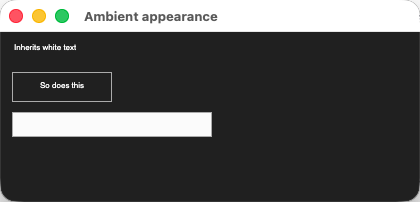
That exact code, running. The Label and Button captions inherited white from the panel; the
TextBox kept its own light background.
That deliberate asymmetry — containers cascade, TextBox/ComboBox don’t — is the single most common
“why is my dark theme half-applied” question, and it is WinForms-correct.
The portability all this buys is visible. Same Explorer sample, three operating systems, one
codebase:
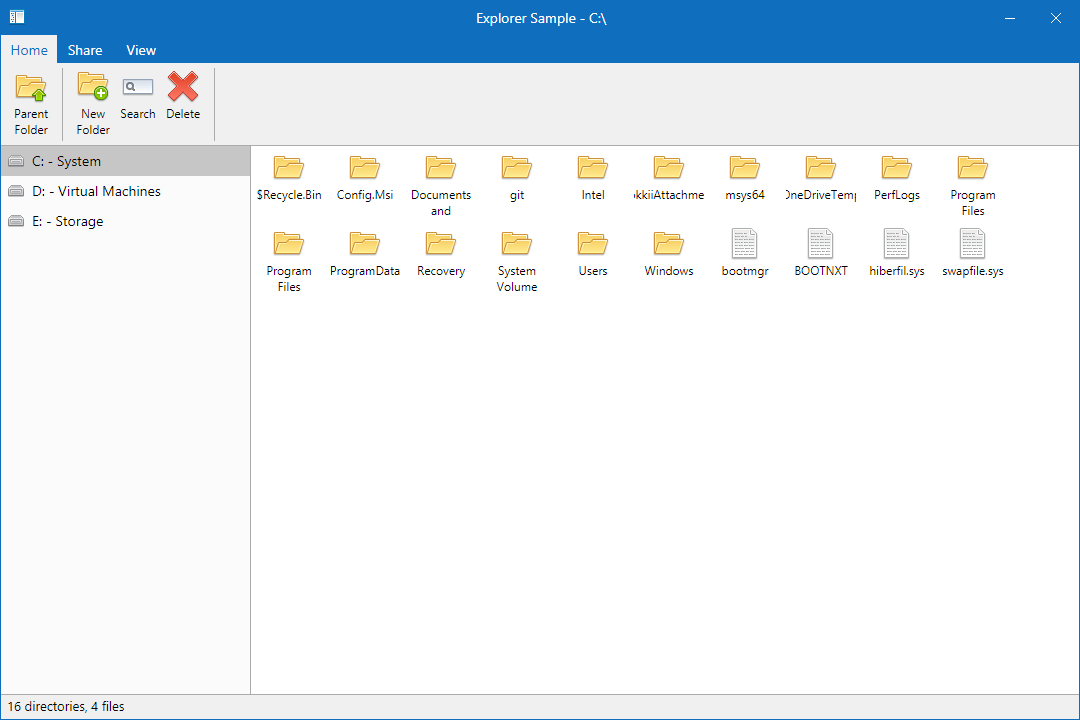
Windows — from the project’s own docs.
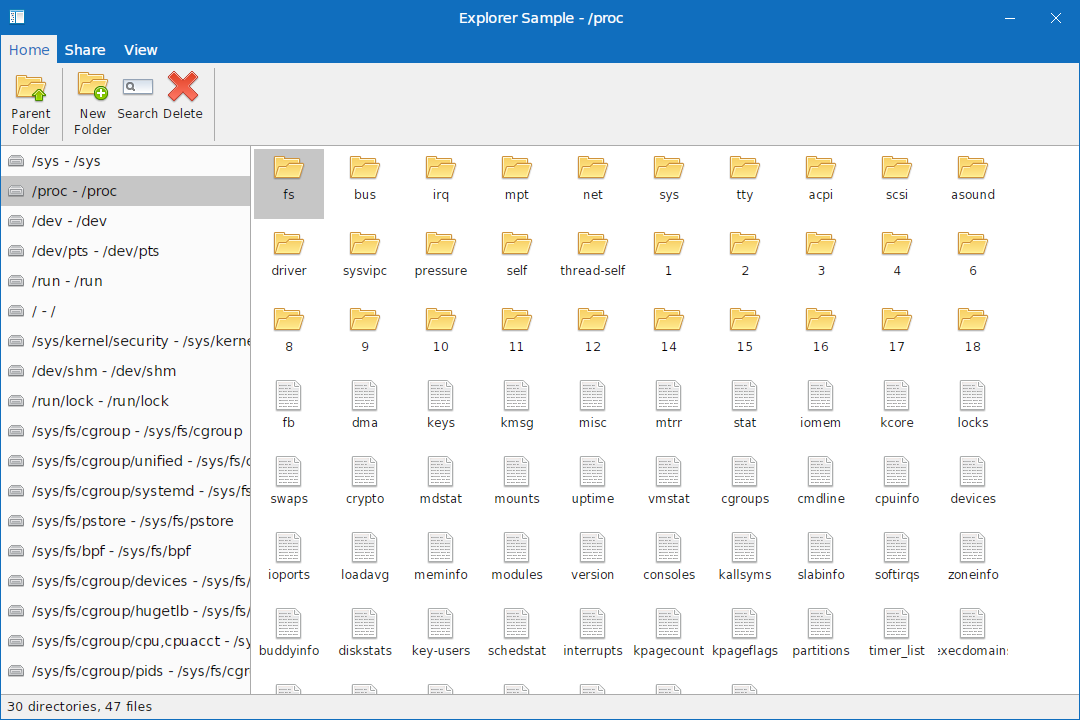
Ubuntu (AMD64) — from the project’s own docs.
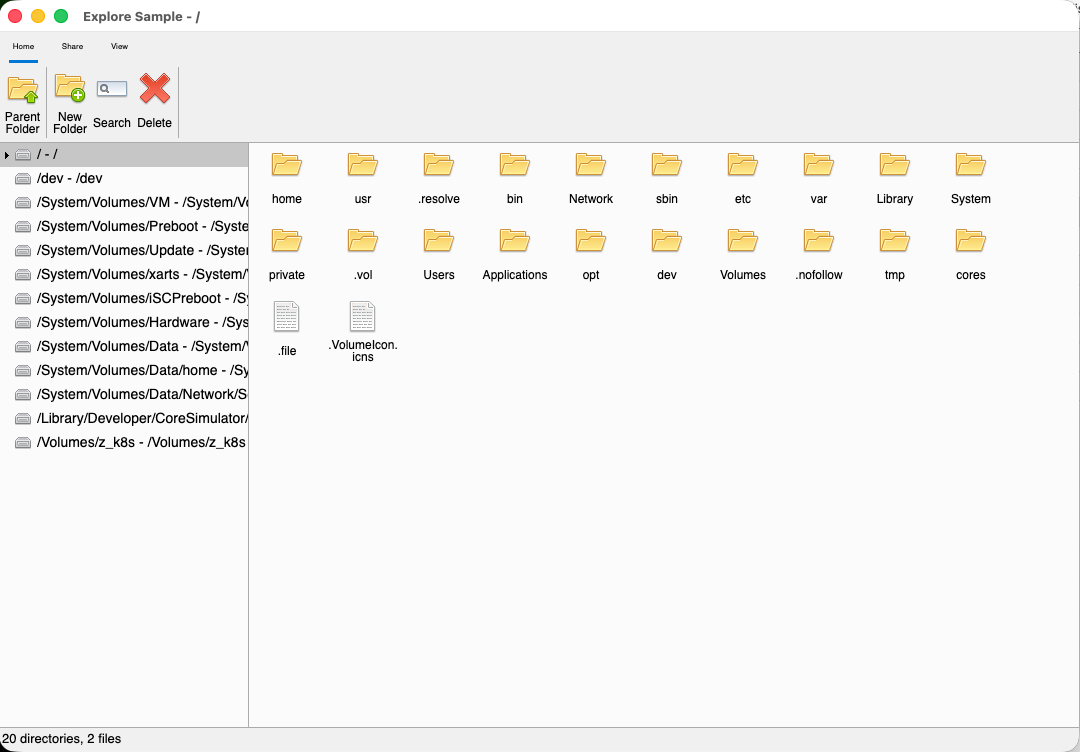
macOS 26 — captured from the current build.
Exercise 1. Answer from the table above, without searching: if you pass myButton.Handle to a
native video library, what happens, and what should you do instead? Then find one place in your own
WinForms codebase that sets BackColor on a container and relies on children inheriting it, and
predict whether it still works.
Module 2 — Your first app
Outcome: you can create a Majorsilence.Forms app from scratch, in either language, and explain what every line does.
The project file
Start from a console app and change three things.
C# — MyApp.csproj
<Project Sdk="Microsoft.NET.Sdk">
  <PropertyGroup>
    <OutputType>WinExe</OutputType>
    <TargetFramework>net10.0</TargetFramework>
    <Nullable>enable</Nullable>
  </PropertyGroup>

  <ItemGroup>
    <PackageReference Include="Majorsilence.Forms" Version="26.9.0" />
    <PackageReference Include="Majorsilence.Forms.Avalonia" Version="26.9.0" />
  </ItemGroup>
</Project>
VB.NET — MyApp.vbproj
<Project Sdk="Microsoft.NET.Sdk">
  <PropertyGroup>
    <OutputType>WinExe</OutputType>
    <TargetFramework>net10.0</TargetFramework>
    <RootNamespace>MyApp</RootNamespace>
    <OptionStrict>On</OptionStrict>
  </PropertyGroup>

  <ItemGroup>
    <PackageReference Include="Majorsilence.Forms" Version="26.9.0" />
    <PackageReference Include="Majorsilence.Forms.Avalonia" Version="26.9.0" />
  </ItemGroup>
</Project>
Note what is not there in the VB version: no MyType, no VB application framework. That’s the one
structural difference the migrator can’t paper over, and it’s why
--dual-build isn’t offered for VB.
A note on target frameworks, since the -windows suffix is the first thing a migration removes: a plain
net10.0 (or net8.0) is all a cross-platform head needs. The core packages (Majorsilence.Forms,
Majorsilence.Forms.Drawing.Common, Majorsilence.Forms.Telerik) also ship a netstandard2.0 build,
which is what lets a classic .NET Framework 4.8 app reference the controls — paired with the net48
row of the WinForms or WPF backend (module 7). The cross-platform backends are
net8.0+ only.
Both packages, and this is the part to say out loud in training. The core Majorsilence.Forms
package references no windowing toolkit at all — only SkiaSharp. It owns the controls and the drawing;
it cannot put a window on screen. Majorsilence.Forms.Avalonia is the backend that does, and
referencing it is what makes the app runnable on Windows, macOS and Linux. Swap that second line for
Majorsilence.Forms.Uno, .Gtk4, .Terminal, .WinForms, .Wpf or .Headless to target a different
host — that one line (plus, for the non-default backends, one line of selection code) is the whole
switch (module 6).
The smallest complete app
C#
using Majorsilence.Forms;

public class MainForm : Form
{
}

static class Program
{
    [STAThread]
    static void Main (string [] args)
    {
        Application.Run (new MainForm ());
    }
}
VB.NET
Imports Majorsilence.Forms

Public Class MainForm
    Inherits Form
End Class

Module Program
    <STAThread>
    Sub Main(args As String())
        Application.Run(New MainForm())
    End Sub
End Module
That app runs on Windows, macOS and Linux with no further configuration, because the backend is resolved automatically when its package is referenced. If you want a different backend, assign it before the first window is created:
C#
Majorsilence.Forms.Backends.Platform.Backend =
    new Majorsilence.Forms.Headless.HeadlessPlatformBackend ();

Application.Run (new MainForm ());     // must come after
VB.NET
Majorsilence.Forms.Backends.Platform.Backend =
    New Majorsilence.Forms.Headless.HeadlessPlatformBackend()

Application.Run(New MainForm())        ' must come after
That ordering constraint is real and bites people: constructing a form touches the backend. It is also why the mobile and browser entry points (module 6) take a factory rather than an instance.
A form that actually does something
Layout in code, an event handler, a dialog, and a modal result — the four things every screen needs.
Note this is ordinary WinForms muscle memory: Anchor, Dock, DialogResult, MessageBox.
C#
using Majorsilence.Forms;
using System.Drawing;

public class GreetForm : Form
{
    private readonly TextBox nameBox;
    private readonly Button  okButton;

    public GreetForm ()
    {
        Text = "Greeter";
        ClientSize = new Size (360, 140);

        var prompt = new Label {
            Name = "promptLabel", Text = "Your name:",
            Left = 12, Top = 16, Width = 100
        };

        nameBox = new TextBox {
            Name = "nameBox", AccessibleName = "Full name",
            Left = 12, Top = 40, Width = 336,
            Anchor = AnchorStyles.Top | AnchorStyles.Left | AnchorStyles.Right
        };

        okButton = new Button {
            Name = "okButton", Text = "OK",
            Left = 188, Top = 96, Width = 75,
            Anchor = AnchorStyles.Bottom | AnchorStyles.Right
        };

        var cancelButton = new Button {
            Name = "cancelButton", Text = "Cancel",
            Left = 273, Top = 96, Width = 75,
            Anchor = AnchorStyles.Bottom | AnchorStyles.Right
        };

        okButton.Click     += OkButton_Click;
        cancelButton.Click += (sender, e) => {
            DialogResult = DialogResult.Cancel;
            Close ();
        };

        Controls.Add (prompt);
        Controls.Add (nameBox);
        Controls.Add (okButton);
        Controls.Add (cancelButton);
    }

    private void OkButton_Click (object? sender, EventArgs e)
    {
        if (string.IsNullOrWhiteSpace (nameBox.Text)) {
            MessageBox.Show ("Please enter a name.", "Greeter",
                MessageBoxButtons.OK, MessageBoxIcon.Warning);
            return;
        }

        DialogResult = DialogResult.OK;
        Close ();
    }
}
VB.NET
Imports Majorsilence.Forms
Imports System.Drawing

Public Class GreetForm
    Inherits Form

    Private ReadOnly nameBox As TextBox
    Private ReadOnly okButton As Button

    Public Sub New()
        Text = "Greeter"
        ClientSize = New Size(360, 140)

        Dim prompt As New Label With {
            .Name = "promptLabel", .Text = "Your name:",
            .Left = 12, .Top = 16, .Width = 100
        }

        nameBox = New TextBox With {
            .Name = "nameBox", .AccessibleName = "Full name",
            .Left = 12, .Top = 40, .Width = 336,
            .Anchor = AnchorStyles.Top Or AnchorStyles.Left Or AnchorStyles.Right
        }

        okButton = New Button With {
            .Name = "okButton", .Text = "OK",
            .Left = 188, .Top = 96, .Width = 75,
            .Anchor = AnchorStyles.Bottom Or AnchorStyles.Right
        }

        Dim cancelButton As New Button With {
            .Name = "cancelButton", .Text = "Cancel",
            .Left = 273, .Top = 96, .Width = 75,
            .Anchor = AnchorStyles.Bottom Or AnchorStyles.Right
        }

        AddHandler okButton.Click, AddressOf OkButton_Click
        AddHandler cancelButton.Click,
            Sub(sender As Object, e As EventArgs)
                DialogResult = DialogResult.Cancel
                Close()
            End Sub

        Controls.Add(prompt)
        Controls.Add(nameBox)
        Controls.Add(okButton)
        Controls.Add(cancelButton)
    End Sub

    Private Sub OkButton_Click(sender As Object, e As EventArgs)
        If String.IsNullOrWhiteSpace(nameBox.Text) Then
            MessageBox.Show("Please enter a name.", "Greeter",
                            MessageBoxButtons.OK, MessageBoxIcon.Warning)
            Return
        End If

        DialogResult = DialogResult.OK
        Close()
    End Sub
End Class
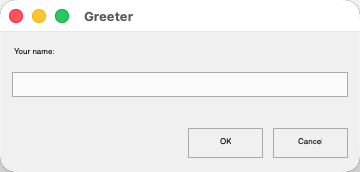
GreetForm, running. The TextBox stretched with the window because of its
Top | Left | Right anchor; the two buttons stayed pinned bottom-right.
Press OK with the box empty and the validation path runs:
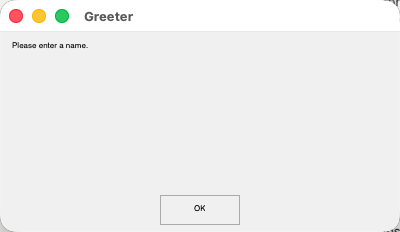
MessageBox.Show opens a real modal window — it blocks the handler and disables the parent, as it
should. Note the honest detail: MessageBoxIcon.Warning is accepted but no warning glyph is drawn
yet. That’s the stub policy in action — the call works, one visual detail
doesn’t, and nothing throws.
Showing it modally from a parent form is unchanged from WinForms:
C#
using var dialog = new GreetForm ();

if (dialog.ShowDialog (this) == DialogResult.OK)
    statusLabel.Text = "Hello!";
VB.NET
Using dialog As New GreetForm()
    If dialog.ShowDialog(Me) = DialogResult.OK Then
        statusLabel.Text = "Hello!"
    End If
End Using
Two things to notice, because they’re the ones that catch people: the Name on every interactive
control isn’t decoration — it becomes the test locator and the accessibility id
(module 8) — and Anchor uses AnchorStyles.Top Or AnchorStyles.Left in VB where C# uses
|, which is the single most common VB porting typo.
A third, if a browser or phone head is anywhere on your roadmap: the blocking ShowDialog and
MessageBox.Show above are desktop-only. On the browser, Android and iOS rows they throw
PlatformNotSupportedException before showing anything, and every dialog has an awaitable twin
(ShowDialogAsync, MessageBox.ShowAsync). Nothing to change today — but read the
async-dialog rule before you write your hundredth handler, because a shared UI
library is far cheaper to write async from the start than to convert later.
What a real app looks like
A single form is not a training target. The PointOfSale sample is the shape to copy for
line-of-business work — four projects, not one:
| Project | Role |
|---|---|
PointOfSale.Client |
The Majorsilence.Forms desktop app (forms, panels, custom controls, services) |
PointOfSale.Api |
ASP.NET Core minimal API with JWT auth and role-based policies |
PointOfSale.Contracts |
DTOs shared by both sides |
PointOfSale.Data |
EF Core + SQLite persistence and seeding |
Nothing about the UI layer constrains your architecture: it is an ordinary .NET client, so your existing DI, HTTP, logging and persistence choices all carry over unchanged.
And Outlaw is the answer to “does it hold up for a complex, multi-pane app?”:
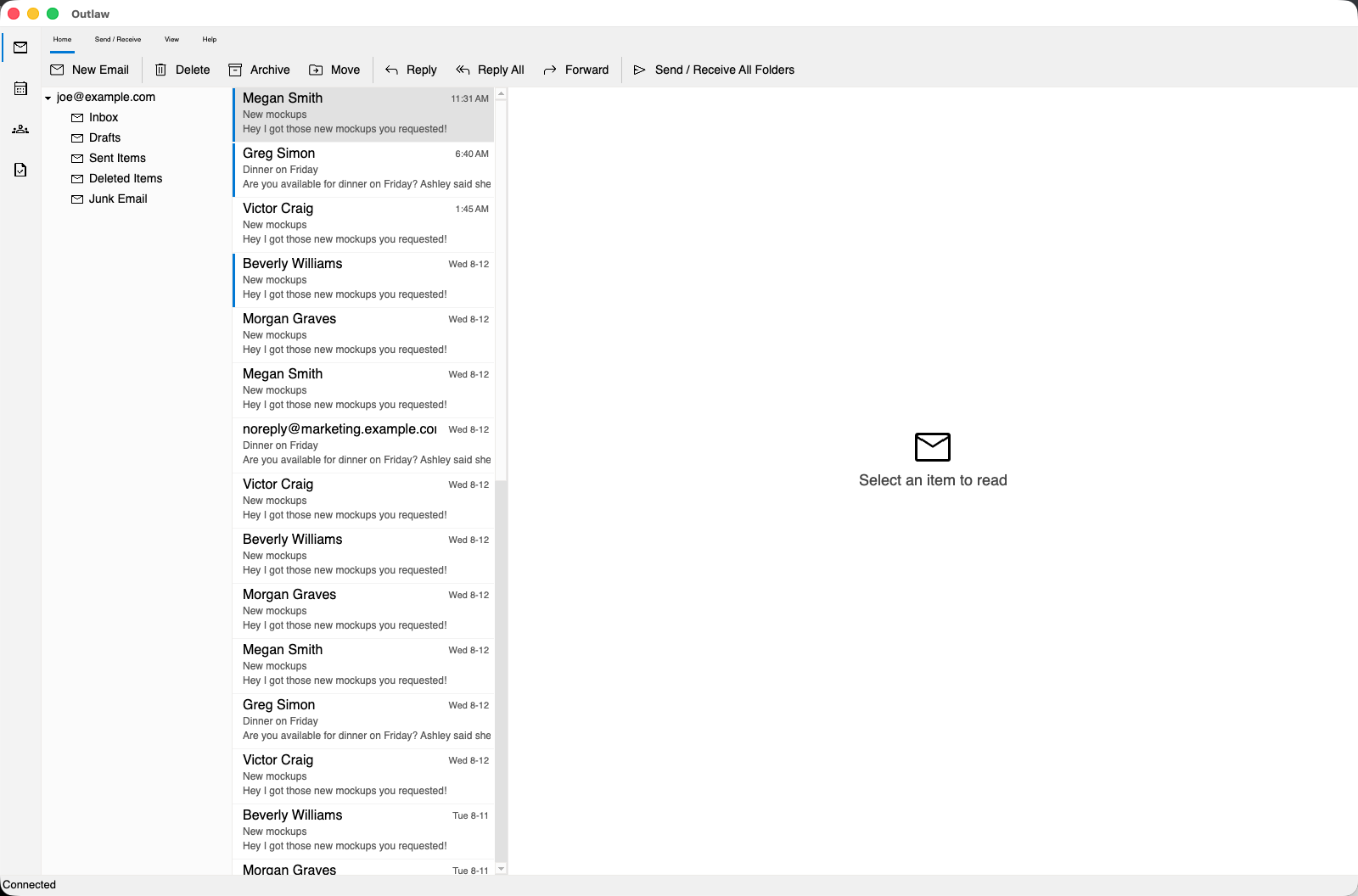
Outlaw on macOS 26 — an Outlook clone, deliberately not a toy demo: an icon rail, folder tree,
virtualized message list and status bar, all drawn by Majorsilence.Forms. The message row is selected;
the reading pane stays a placeholder because the sample never wires selection to it — it’s a layout and
control-density exercise, not a mail client.
Plan around this now: there is no visual designer yet. Designer code migrates and runs — the
*.Designer.cs/*.Designer.vb pattern is preserved as-is, and the design-time types your control
libraries reference still compile — but nothing instantiates them at runtime and there is no design
surface to edit layout in. It is a wanted feature with a written plan, not a deferred one. Budget for
hand-editing designer files, or for laying out in code as above.
Exercise 2. Build GreetForm in your team’s language. Then switch the backend package to Headless
and confirm the app starts and exits without opening a window — you’ll reuse exactly that setup in
module 8.
Module 3 — Knowing what works before you build on it
Outcome: before relying on any member, you know how to find out whether it really works — and you recognise the framework’s characteristic failure mode on sight.
This is the most important module in the guide. Read the
COMPATIBILITY_MATRIX.md once end to end,
then keep it open while you work. It exists for exactly your situation: a developer with a WinForms
codebase deciding what to trust.
The stub policy
If a member has no working implementation yet, it safely no-ops (or returns a sensible default) instead of throwing
NotImplementedException.
That is a deliberate, consistent policy across the whole compatibility layer, and it is what lets migrated code compile and run even where a visual feature does nothing yet. Concretely:
- A property with no backing behavior is a plain settable auto-property — it stores what you set and reads back, it just doesn’t change runtime behavior.
- A method with no implementation returns a neutral value rather than throwing — e.g. a dialog whose
ShowDialog()has no real UI yet returnsDialogResult.OKimmediately. - An event that is never raised still compiles and can be subscribed to; it simply never fires. Used sparingly, and called out per type in the matrix.
If you hit a member that throws instead of stubbing, that’s a bug — report it (module 10).
The cost of that policy — and the story to tell your team
A silent no-op is the hardest kind of gap to find: it compiles, it runs, and the only symptom is wrong output somewhere downstream. The canonical example is worth telling verbatim, because it teaches the failure mode better than any rule:
Image.MakeTransparent was empty. Ported game code keyed a sprite sheet’s background colour to
transparent, the call did nothing, and every sprite drew with a white box behind it. Nothing threw.
There was nothing to grep for.
Two things follow for you. First, when something renders or behaves wrongly and nothing threw,
suspect a stub before you suspect your own code — check the matrix row for the member involved.
Second, that class of gap is now guarded: the project pins its known empty-bodied public void methods
in a baseline test (NoOpStubBaseline.txt — 161 entries at the time of writing), so a new one can’t be
added silently, and the entries shrink over releases. Three sibling baselines pin the other kinds of
hollowness — events that are declared but inert, events never raised, and properties that only store a
value (79, 127 and 812 of 1,254 respectively as the matrix currently reports them). That’s why the
matrix is worth trusting as a reference rather than treating as marketing: the numbers are enforced,
not estimated.
Pin the behavior you depend on
The practical defence is a test per assumption. When a feature matters, assert the effect, not the member’s existence — that’s the difference between a test that catches a stub and one that doesn’t:
C#
using Majorsilence.Forms.Drawing;
using Majorsilence.Forms.Drawing.Imaging;
using Xunit;

[Fact]
public void MakeTransparent_actually_clears_the_key_colour ()
{
    using var bitmap = new Bitmap (4, 4);
    using (var g = Graphics.FromImage (bitmap))
    using (var brush = new SolidBrush (Color.Magenta))
        g.FillRectangle (brush, new Rectangle (0, 0, 4, 4));

    bitmap.MakeTransparent (Color.Magenta);

    // Assert the RESULT, not that the method exists — a stub would pass an "it compiles" test.
    Assert.Equal (0, bitmap.GetPixel (0, 0).A);
}
VB.NET
Imports Majorsilence.Forms.Drawing
Imports Majorsilence.Forms.Drawing.Imaging
Imports Xunit

<Fact>
Public Sub MakeTransparent_actually_clears_the_key_colour()
    Using bitmap As New Bitmap(4, 4)
        Using g = Graphics.FromImage(bitmap)
            Using brush As New SolidBrush(Color.Magenta)
                g.FillRectangle(brush, New Rectangle(0, 0, 4, 4))
            End Using
        End Using

        bitmap.MakeTransparent(Color.Magenta)

        ' Assert the RESULT, not that the method exists.
        Assert.Equal(0, CInt(bitmap.GetPixel(0, 0).A))
    End Using
End Sub
Write one of those for each member on your critical path. It costs minutes and it converts a silent no-op into a red build the day it matters.
Check, don’t assume — the evidence
The project diffs its own public surface against the real System.Windows.Forms reference assembly by
reflection and keeps the result as a committed baseline. That audit’s first run found 1,905 missing
entries — including 126 enum members that exist with the wrong numeric value. That last category
is the one to take personally: the code compiles, runs, and silently means something else. It is the
best argument available for verifying the specific members your app leans on instead of assuming
parity.
Both API-surface baselines — WinForms and GDI+ — are now at zero. Every member upstream declares,
this layer declares. Read that carefully, because it is the smaller half of the problem: a name-level
diff cannot ask whether a member behaves like WinForms. A twelve-area source audit (2026-08-25) asked
exactly that and found 483 places where behaviour differed — 41 of them severe enough to break a
common migrated app. Most of that list has since landed in phases (keyboard pre-processing through
ProcessCmdKey, one focus/validation choke point, real dialogs, AutoScaleMode.Font really scaling,
live data binding with a working CurrencyManager, ListView.View = Details rendering as a table,
form lifecycle events in upstream order, text-box undo on Ctrl+Z, …); what remains is tracked in
docs/behaviour-gap-plan.md. The
lesson for your team doesn’t change: “it compiles” means the name exists; the matrix row tells you
whether it works.
Reading the per-control table
Status in the matrix is scored from a migrating developer’s point of view:
| Status | Means |
|---|---|
| Implemented | The mainstream surface is there. Gaps are limited to deep/rare corners or the systemic patterns the matrix states once. |
| Partial | Names the specific commonly-used members that are missing. |
| Missing | The type doesn’t exist under that name at all. |
The high-traffic controls (Button, TextBox, Panel, TabControl, TableLayoutPanel, TreeView,
ListView, menus, toolbars, status bars, common dialogs, …) are functionally implemented, not stubs.
The gaps worth knowing before you plan work:
| Type | Watch out for |
|---|---|
DataGridView |
The largest single-type gap — but the highest-traffic hooks are real and firing: CellFormatting, CellPainting, RowPrePaint/RowPostPaint, CellParsing, RowValidating/RowValidated, GetClipboardContent(), and the border-style properties. Still declared-but-never-raised: RowsAdded/RowsRemoved, DataError, SortCompare, CellValueNeeded/CellValuePushed, the CellMouse* family, and the granular *Changed events. Auto-sizing only invalidates. |
ListView |
No owner-draw, no virtual-mode retrieval callbacks (VirtualMode is a plain property), no InsertionMark. |
TreeView |
No Sorted, no ImageKey/SelectedImageKey (index-based ImageIndex works), no HitTest, no ShowNodeToolTips. |
ComboBox/ListBox/CheckedListBox |
DataSource/DisplayMember/ValueMember exist; the binding format hooks and Sort() don’t. |
RichTextBox, MaskedTextBox |
Undo/redo and SelectedRtf; overwrite-mode and char-index positioning, respectively. |
ToolStrip family |
MenuStrip/ContextMenuStrip/StatusStrip genuinely derive from ToolStrip, so the whole surface is reachable — but the ToolStrip-level members are stubs. Assigning Renderer/RenderMode does not change painting; LayoutStyle does not change layout; there is no overflow button. What works is what each control already did well. |
WebBrowser |
Navigation works; there is no DOM object model at all (Document, HtmlElement, …), because it’s backed by a real webview, not COM automation. |
| Common dialogs | Results and ShowDialog() work. Windows-shell-only extras (CustomPlaces, AutoUpgradeEnabled, dialog hook plumbing) are absent — expected, there’s no native dialog to hook. |
Working with the grid, concretely. Since DataGridView is where most LOB apps live, here is the
shape that is supported — formatting and painting through the events that really fire, rather than
through the members that don’t:
C#
var grid = new DataGridView { Name = "ordersGrid", Dock = DockStyle.Fill };
grid.DataSource = orders;

// CellFormatting is real: it fires per cell during paint.
grid.CellFormatting += (sender, e) => {
    if (grid.Columns [e.ColumnIndex].Name != "Total")
        return;

    if (e.Value is decimal total) {
        e.Value = total.ToString ("C");
        e.CellStyle.ForeColor = total < 0 ? Color.Firebrick : Color.Black;
        e.FormattingApplied = true;          // tell the grid not to format it again
    }
};

// CellParsing is real too: it runs on edit commit, and your typed value is what gets stored.
grid.CellParsing += (sender, e) => {
    if (grid.Columns [e.ColumnIndex].Name == "Total"
        && decimal.TryParse (e.Value?.ToString (), out var parsed)) {
        e.Value = parsed;
        e.ParsingApplied = true;
    }
};
VB.NET
Dim grid As New DataGridView With {.Name = "ordersGrid", .Dock = DockStyle.Fill}
grid.DataSource = orders

' CellFormatting is real: it fires per cell during paint.
AddHandler grid.CellFormatting,
    Sub(sender As Object, e As DataGridViewCellFormattingEventArgs)
        If grid.Columns(e.ColumnIndex).Name <> "Total" Then Return

        If TypeOf e.Value Is Decimal Then
            Dim total = CDec(e.Value)
            e.Value = total.ToString("C")
            e.CellStyle.ForeColor = If(total < 0, Color.Firebrick, Color.Black)
            e.FormattingApplied = True        ' tell the grid not to format it again
        End If
    End Sub

' CellParsing is real too: it runs on edit commit, and your typed value is what gets stored.
AddHandler grid.CellParsing,
    Sub(sender As Object, e As DataGridViewCellParsingEventArgs)
        Dim parsed As Decimal
        If grid.Columns(e.ColumnIndex).Name = "Total" AndAlso
           Decimal.TryParse(If(e.Value?.ToString(), String.Empty), parsed) Then
            e.Value = parsed
            e.ParsingApplied = True
        End If
    End Sub
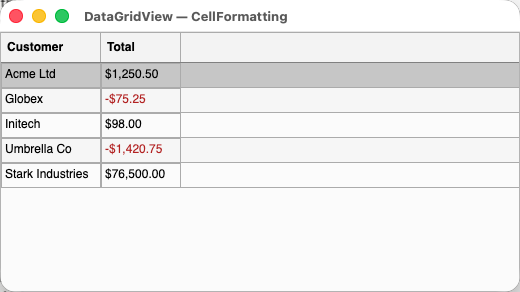
That code, running against a plain List<Order>: columns auto-generated from the bound type, values
formatted as currency, and negatives red because the handler’s e.CellStyle.ForeColor really does
reach the renderer.
One version caveat worth knowing if you are still pinned to 26.0.30. In that package, bound cell values arrive at
CellFormattingalready converted to strings, soe.Value is decimalnever matches and this handler silently does nothing — the exact failure mode this module is about. It was fixed in the releases that followed (bound cells keep the member’s type), so the code above is correct on a current version such as 26.9.0. If you’re on 26.0.30 and see unformatted values, parse defensively instead:decimal.TryParse (e.Value?.ToString (), out var total). That form works either way.
What you must not write against yet, from the same table: RowsAdded, DataError, SortCompare,
CellValueNeeded (so no virtual mode), and the CellMouse* family. Each compiles and silently never
fires — exactly the failure mode from above.
Two notes for teams coming from vendor stacks. Telerik UI for WinForms has a first-class
compatibility layer (Majorsilence.Forms.Telerik) whose own source states the deal plainly: coverage
is compile-and-approximate, not pixel-perfect. And spellcheck (wired into TextBox) is a
dependency-free from-scratch implementation with wavy underlines and a suggestions menu — not a
WinForms API at all; it exists to back Telerik’s RadSpellChecker.
Exercise 3. Pick three members your own app depends on — one you’re sure about, one you’re not, and one exotic. For each, determine from the matrix whether it is implemented, stubbed, or absent, then write a pinning test for the one you’re least sure of.
Module 4 — Drawing and custom paint
Outcome: you know which System.Drawing types stay, which move, and how to write both
WinForms-style and Skia-native painting code.
Majorsilence.Forms.Drawing is a Skia-backed, cross-platform replacement for the Windows-only
System.Drawing.Common (GDI+). The split that governs everything:
| Source | Target | Why |
|---|---|---|
System.Drawing primitives — Color, Point, PointF, Size, SizeF, Rectangle, RectangleF |
unchanged | They ship in System.Drawing.Primitives on every platform already. |
System.Drawing GDI+ types — Bitmap, Font, Pen, Brush, Graphics-adjacent |
Majorsilence.Forms.Drawing |
GDI+ is Windows-only in System.Drawing.Common; reimplemented on SkiaSharp. |
System.Drawing.Drawing2D / .Imaging / .Text |
Majorsilence.Forms.Drawing.Drawing2D / .Imaging / .Text |
Same split, sub-namespaced. |
System.Drawing.Printing |
Majorsilence.Forms.Printing |
Printing sits on the Forms side of the compatibility layer, not the drawing side. |
System.Windows.Forms.VisualStyles, System.Drawing.Design, System.ComponentModel.Design |
left alone | No equivalent — flagged for manual review rather than rewritten into something that doesn’t exist. |
One packaging detail that trips people who try to use the drawing layer on its own: the value types,
images, fonts and resources live in the Majorsilence.Forms.Drawing.Common package, but Graphics
itself ships in the core Majorsilence.Forms package (still under the
Majorsilence.Forms.Drawing namespace). So headless image manipulation needs the core package
referenced too — which you have anyway in any app.
Three specifics that cause real support tickets:
System.Drawing.Commonmust be removed from your project, not merely because it’s Windows-only from .NET 7 on, but because leaving it referenced putsSystem.Drawing.Bitmap/Font/Penback in scope beside the Majorsilence replacements — every unqualified use then fails as an ambiguous reference rather than resolving to the port.-
SystemColorsandColorTranslatorare the ambiguity exceptions. They live inSystem.Drawing.Primitives, so they’re still resolvable through theusing System.Drawing;you keep for primitives — and used unqualified they collide with the Majorsilence ones (CS0104). The fix is a one-line alias, which the migrator adds for you, only in files that need it:C#
using System.Drawing;
using SystemColors = Majorsilence.Forms.SystemColors;
VB.NET
Imports System.Drawing Imports SystemColors = Majorsilence.Forms.SystemColors - The gradient and hatch brushes live where GDI+ puts them:
LinearGradientBrush,PathGradientBrush,HatchBrushandHatchStyleare inMajorsilence.Forms.Drawing.Drawing2D.Brush,SolidBrushandTextureBrushare inMajorsilence.Forms.Drawing— those really areSystem.Drawingtypes. Code reaching them through the rewritten import is unaffected; only a fully-qualified reference needs updating.
Offscreen image work
Graphics.FromImage works the way it does in GDI+, which means most of your existing imaging code
ports by changing imports alone:
C#
using Majorsilence.Forms.Drawing;
using Majorsilence.Forms.Drawing.Drawing2D;
using Majorsilence.Forms.Drawing.Imaging;
using System.Drawing;

public static void SaveThumbnail (string sourcePath, string targetPath, int width)
{
    using var source = new Bitmap (sourcePath);
    var height = (int) (source.Height * (width / (double) source.Width));

    using var thumb = new Bitmap (width, height);

    using (var g = Graphics.FromImage (thumb)) {
        g.InterpolationMode = InterpolationMode.HighQualityBicubic;
        g.SmoothingMode     = SmoothingMode.AntiAlias;

        g.DrawImage (source,
            new Rectangle (0, 0, width, height),
            0, 0, source.Width, source.Height,
            GraphicsUnit.Pixel);

        using var watermark = new SolidBrush (Color.FromArgb (96, Color.Black));
        g.FillRectangle (watermark, new Rectangle (0, height - 18, width, 18));
    }

    thumb.Save (targetPath, ImageFormat.Png);
}
VB.NET
Imports Majorsilence.Forms.Drawing
Imports Majorsilence.Forms.Drawing.Drawing2D
Imports Majorsilence.Forms.Drawing.Imaging
Imports System.Drawing

Public Shared Sub SaveThumbnail(sourcePath As String, targetPath As String, width As Integer)
    Using source As New Bitmap(sourcePath)
        Dim height = CInt(source.Height * (width / CDbl(source.Width)))

        Using thumb As New Bitmap(width, height)
            Using g = Graphics.FromImage(thumb)
                g.InterpolationMode = InterpolationMode.HighQualityBicubic
                g.SmoothingMode = SmoothingMode.AntiAlias

                g.DrawImage(source,
                            New Rectangle(0, 0, width, height),
                            0, 0, source.Width, source.Height,
                            GraphicsUnit.Pixel)

                Using watermark As New SolidBrush(Color.FromArgb(96, Color.Black))
                    g.FillRectangle(watermark, New Rectangle(0, height - 18, width, 18))
                End Using
            End Using

            thumb.Save(targetPath, ImageFormat.Png)
        End Using
    End Using
End Sub
The actual output of that method: a 1080×752 screenshot resized to 320 px wide with bicubic interpolation, with the semi-transparent watermark bar along the bottom.
That code has no UI dependency at all — it runs in a console app, a service, or a test.
Custom paint: two ways, and when to use each
PaintEventArgs gives you both surfaces. e.Graphics is the GDI+-shaped wrapper, so ported
OnPaint code compiles unchanged. e.Canvas is the raw SKCanvas the framework itself draws with —
reach for it when you want something Skia does well and GDI+ never did.
C# — WinForms-style, ports unchanged
using Majorsilence.Forms;
using Majorsilence.Forms.Drawing;
using System.Drawing;

public class Badge : Control
{
    protected override void OnPaint (PaintEventArgs e)
    {
        base.OnPaint (e);

        using var fill = new SolidBrush (Color.FromArgb (110, 67, 166));
        using var pen  = new Pen (Color.White, 2);

        e.Graphics.FillRectangle (fill, ClientRectangle);
        e.Graphics.DrawRectangle (pen, 1, 1, Width - 3, Height - 3);
    }
}
VB.NET — WinForms-style, ports unchanged
Imports Majorsilence.Forms
Imports Majorsilence.Forms.Drawing
Imports System.Drawing

Public Class Badge
    Inherits Control

    Protected Overrides Sub OnPaint(e As PaintEventArgs)
        MyBase.OnPaint(e)

        Using fill As New SolidBrush(Color.FromArgb(110, 67, 166))
            Using pen As New Pen(Color.White, 2)
                e.Graphics.FillRectangle(fill, ClientRectangle)
                e.Graphics.DrawRectangle(pen, 1, 1, Width - 3, Height - 3)
            End Using
        End Using
    End Sub
End Class
C# — Skia-native, for effects GDI+ can’t express
using SkiaSharp;

protected override void OnPaint (PaintEventArgs e)
{
    base.OnPaint (e);

    using var paint = new SKPaint {
        IsAntialias = true,
        Shader = SKShader.CreateLinearGradient (
            new SKPoint (0, 0), new SKPoint (0, Height),
            new [] { new SKColor (110, 67, 166), new SKColor (185, 138, 255) },
            SKShaderTileMode.Clamp)
    };

    // Rounded rect with a real gradient shader — one call, no GDI+ equivalent.
    e.Canvas.DrawRoundRect (new SKRect (0, 0, Width, Height), 12, 12, paint);
}
VB.NET — Skia-native
Imports SkiaSharp

Protected Overrides Sub OnPaint(e As PaintEventArgs)
    MyBase.OnPaint(e)

    Using paint As New SKPaint With {
        .IsAntialias = True,
        .Shader = SKShader.CreateLinearGradient(
            New SKPoint(0, 0), New SKPoint(0, Height),
            {New SKColor(110, 67, 166), New SKColor(185, 138, 255)},
            SKShaderTileMode.Clamp)
    }
        ' Rounded rect with a real gradient shader — one call, no GDI+ equivalent.
        e.Canvas.DrawRoundRect(New SKRect(0, 0, Width, Height), 12, 12, paint)
    End Using
End Sub
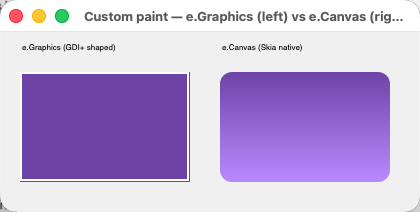
Both controls in one window. Left: the GDI+-shaped path — flat fill, 2 px white border. Right: the
Skia path — rounded corners and a real gradient shader, in a single DrawRoundRect call.
Guidance for your team: migrate with e.Graphics (it’s free — the code already exists), and reach
for e.Canvas deliberately for new visuals. Mixing them in one handler is fine; they draw to the same
surface.
The canvas is in logical units — do not scale it yourself. Both examples above draw against
ClientRectangle, Width and Height and are the right size on a HiDPI desktop or a phone (where
Android reports a scaling of roughly 2.6–2.75) with no further code, because the framework scales the
canvas to the display before your OnPaint runs. Before 2026-10-01 the canvas was in device pixels
and a custom control had to call e.Graphics.ScaleTransform (e.Scaling, e.Scaling) itself. If you
have that call in a control, remove it — it now scales the drawing twice, and the symptom is a
control that draws at double size on a 2× display and looks fine on your 1× monitor. e.ClipRectangle
and e.Canvas are logical too; PaintEventArgs.Scaling is still there for the rare case where you want
to land on an exact device pixel (a hairline, a pixel-art sprite). The only place you still receive
device pixels is the owner-draw family — DrawItem, DrawNode, CellPainting and friends — whose
Bounds and Graphics agree with each other but not with the control’s logical ClientRectangle. Test
either kind under MF_HEADLESS_SCALE=2 (module 8).
Animating a control: RequestAnimationFrame
A Timer at 16 ms is how WinForms animated, and it still works. The framework also offers the browser’s
idiom, which is display-aligned on Avalonia and — the part that matters for your tests — fully
deterministic on Headless. control.RequestAnimationFrame (callback) calls back once, at the start of
the next frame, with a timestamp that only has meaning as a difference; ask again from inside the
callback to keep going. (Checked against docs/animation.md, not run for this guide.)
C#
private TimeSpan? start;
private float fade;                  // 0..1 — read by OnPaint

public void StartFade ()
{
    start = null;
    RequestAnimationFrame (OnFrame);
}

private void OnFrame (TimeSpan timestamp)
{
    start ??= timestamp;
    var progress = Math.Min (1, (timestamp - start.Value).TotalSeconds / 0.4);

    fade = (float) progress;
    Invalidate ();

    if (progress < 1)
        RequestAnimationFrame (OnFrame);   // served on the *next* frame, never this one
}
VB.NET
Private start As TimeSpan?
Private fade As Single               ' 0..1 — read by OnPaint

Public Sub StartFade()
    start = Nothing
    RequestAnimationFrame(AddressOf OnFrame)
End Sub

Private Sub OnFrame(timestamp As TimeSpan)
    If Not start.HasValue Then start = timestamp
    Dim progress = Math.Min(1, (timestamp - start.Value).TotalSeconds / 0.4)

    fade = CSng(progress)
    Invalidate()

    If progress < 1 Then
        RequestAnimationFrame(AddressOf OnFrame)   ' served on the *next* frame, never this one
    End If
End Sub
On the Headless backend nothing runs until you step the clock, which turns an animation into an exact
assertion: HeadlessRenderer.AnimationClock.Reset (), request your frames, then
HeadlessRenderer.AnimationClock.Step (10) runs ten frames of 1/60 s and your callback has seen
exactly ten timestamps. The Majorsilence.Forms.Animation package layers Tween<T>, Easing and
control.Animate (…) on top of the same frame request, and SystemInformation.PrefersReducedMotion
tells you when the user asked for less of it — advisory, so the check is yours to make at the point
you start an animation. Details in
docs/animation.md.
One trap when you go Skia-native: raw SKFont/DrawText does no font fallback. The framework’s own
text rendering resolves missing glyphs through a fallback chain, but a bare SKTypeface.Default does
not — draw a string containing a glyph that typeface lacks (an arrow, an emoji, CJK) and you get the
missing-glyph box, silently. Stick to e.Graphics.DrawString for user-facing text, or pick your
typeface explicitly.
Where Skia genuinely cannot follow GDI+, the matrix says so rather than pretending: a Pen with a
custom line cap strokes using that cap’s declared BaseCap (SKPaint offers only butt/round/square),
Pen.Alignment is stored but not applied, and assigning Image.Palette doesn’t re-quantize because
modern SkiaSharp has no indexed bitmap type — every surface is 32bpp.
Exercise 4. Port one piece of GDI+ code you own — a thumbnail generator, a chart, a watermark —
against Majorsilence.Forms.Drawing in a console app with no UI. Then take one custom-painted control
and add a Skia-native touch (a gradient, a blur, a rounded clip) through e.Canvas.
Module 5 — Migrating your WinForms app
Outcome: you can run majorsilence-migrate on your solution, read its report, and work the
manual-fix checklist that follows.
Install
dotnet tool install -g Majorsilence.Forms.Migrator
majorsilence-migrate --help
Prefer a per-repo install (dotnet new tool-manifest, then
dotnet tool install Majorsilence.Forms.Migrator, run as dotnet majorsilence-migrate), so the whole
team runs the same version. The tool package is the only shipped form — releases used to attach a
self-contained single-file binary per platform and no longer do. It needs a .NET runtime on the machine
(it rolls forward to whatever newer major you have), and if you’d rather install nothing, run it from a
clone with dotnet run --project tools/Majorsilence.Forms.Migrator -- <input>.
What the migration looks like in your source
Before anything else, see the size of the change. This is a typical form’s head, before and after:
C# — before
using System;
using System.Drawing;
using System.Windows.Forms;

namespace Legacy.App
{
    public partial class CustomerForm : Form
    {
        public CustomerForm ()
        {
            InitializeComponent ();
            headerLabel.ForeColor = SystemColors.ControlText;
            logo.Image = new Bitmap ("Images/logo.png");
        }
    }
}
C# — after
using System;
using System.Drawing;                                        // kept: Color, Point, Size, Rectangle
using Majorsilence.Forms;                                    // was System.Windows.Forms
using Majorsilence.Forms.Drawing;                            // for Bitmap
using SystemColors = Majorsilence.Forms.SystemColors;         // added: resolves CS0104

namespace Legacy.App
{
    public partial class CustomerForm : Form
    {
        public CustomerForm ()
        {
            InitializeComponent ();                          // your Designer file is untouched
            headerLabel.ForeColor = SystemColors.ControlText;
            logo.Image = new Bitmap ("Images/logo.png");
        }
    }
}
VB.NET — before
Imports System.Drawing
Imports System.Windows.Forms

Public Class CustomerForm
    Inherits Form

    Private Sub CustomerForm_Load(sender As Object, e As EventArgs) Handles MyBase.Load
        headerLabel.ForeColor = SystemColors.ControlText
        logo.Image = New Bitmap("Images/logo.png")
    End Sub
End Class
VB.NET — after
Imports System.Drawing                                        ' kept: Color, Point, Size, Rectangle
Imports Majorsilence.Forms                                    ' was System.Windows.Forms
Imports Majorsilence.Forms.Drawing                            ' for Bitmap
Imports SystemColors = Majorsilence.Forms.SystemColors         ' added: resolves the ambiguity

Public Class CustomerForm
    Inherits Form

    ' The migrator also re-injects the implicit parameterless constructor that MyType=Empty
    ' used to supply, using knowledge of this form's Designer partial so it isn't duplicated.
    Public Sub New()
        InitializeComponent()
    End Sub

    Private Sub CustomerForm_Load(sender As Object, e As EventArgs) Handles MyBase.Load
        headerLabel.ForeColor = SystemColors.ControlText
        logo.Image = New Bitmap("Images/logo.png")
    End Sub
End Class
That’s the whole shape of it: imports change, Handles clauses and designer code survive, and your
business logic isn’t touched.
Know what the tool is before you argue with it
majorsilence-migrate is a deliberate multi-pass textual/regex rewriter. It does not parse a
syntax tree or resolve symbols, and that is the point:
- It works on broken code. A half-migrated solution, a
.vbreferencing an unported type, a project with a missing reference — none of it stops the rewriter, because it never needs the code to compile or even parse. A Roslyn tool would refuse to touch a project until it builds, which defeats the purpose of a first pass over a legacy codebase. - It’s fast — thousands of files in seconds.
- What it gives up: true cross-project symbol resolution. It can’t tell whether a bare
PanelisSystem.Windows.Forms.Panelor your own class namedPanel; it relies on namespace-prefix patterns and import context. Every namespace it doesn’t recognise is flagged for manual review rather than silently guessed at.
There is an opt-in second engine for exactly that blind spot — --engine roslyn, layered on top of
the textual one, using real symbol resolution:
--engine text (default) |
--engine roslyn |
|
|---|---|---|
| Input | Any .sln/.csproj/.vbproj/directory/single file |
Needs a loadable project; a bare directory or single file falls back to text for the whole run, with a warning |
| Tolerates non-compiling code | Yes | No |
| Speed | Seconds | Orders of magnitude slower (MSBuild evaluation dominates) |
| Same-named-type disambiguation | No | Yes — the reason it exists |
| Failure handling | N/A | Fails closed per project (that project’s files fall back to text). If MSBuild can’t be located at all, the run hard-fails rather than silently downgrading |
Team rule: the first pass over a large legacy codebase always uses the default --engine text.
Reach for --engine roslyn afterwards, on the now-loadable result, only when you have a confirmed
case of a custom type sharing a bare name with a WinForms/GDI+ type. Note it also produces fewer
warnings in one place — it fixes unqualified GDI+ types under a bare using System.Drawing; outright
instead of flagging them. That divergence is not a regression.
The recommended first run
# On a clean git branch, dry-run first to see the scope:
majorsilence-migrate MySolution.sln --dry-run --diff

# Then run for real — the diff against the previous commit IS the migration:
git checkout -b migrate-to-majorsilence
majorsilence-migrate MySolution.sln --no-backup
git add -A && git commit -m "Migrate to Majorsilence.Forms"
Running in place on a git-tracked branch (with --no-backup, since git is your backup) makes the
migration idempotent and diffable: run it, inspect file by file, re-run safely when you pull in more
legacy code later.
Options worth knowing on day one:
| Option | Use |
|---|---|
-o, --output <dir> |
Write to a mirror tree instead of converting in place |
-n, --dry-run, --diff |
Scope it before you commit to it |
--backend <name> |
avalonia (default) | uno | headless — which backend package it references |
--tfm <tfm> |
Force a TFM. Default: keep the version, drop the -windows suffix |
--package-version <v> |
Defaults to the migrator’s own version — tool and packages ship from the same release |
--map <file> |
Extra namespace mappings for a vendor with no built-in support (repeatable) |
--dual-build |
Keep a C# project building against real WinForms too — see below |
--strict |
Exit non-zero on any manual-review warning. This is your CI gate. |
--report <file> / --no-report |
The Markdown report |
For a vendor with no built-in mapping, a --map file is just JSON:
{
  "namespaces":     { "DevExpress.XtraEditors": "Majorsilence.Forms.DevExpress" },
  "removePackages": [ "DevExpress.Win.*" ]
}
What it actually changes
- Project files — removes
UseWindowsForms/UseWPF, drops the-windowsTFM suffix (including in imported.props/.targets), drops the Windows-desktop framework reference, removes WinForms-only NuGet packages (Telerik, DevExpress,System.Drawing.Common), and addsMajorsilence.Forms+ a backend reference — to every project it touches. That set is wider than “WinForms projects”: a plain class library that never mentionsSystem.Windows.Formsstill gets rewritten if it has an image or font helper, and can’t compile without the reference. Projects using only the surviving primitives are left completely alone. - Source files — namespace rewrites via a longest-prefix-first table, duplicate imports collapsed,
the
SystemColors/ColorTranslatoralias emitted where needed, and for VB: the implicit constructor re-injected, aMy.Resourcesaccessor generated, and remainingMy.*usage warned on. - Resx files — scanned for image/type references that must survive the swap.
- Report — a Markdown summary (default
migration-report.md).
Reading the report
Three sections matter:
- Scanned vs. changed counts — the scope of the diff, at a glance.
- Per-file change list — everything actually touched.
- Manual review — every warning grouped by cause: unsupported namespaces, unqualified GDI+ types
under a bare
System.Drawingimport,My.*usage, and any project skipped outright. The most common skip is a legacy non-SDK-style.csproj/.vbproj, which you must convert to SDK style first — a project-format prerequisite, not something the migrator missed.
Incremental migration with --dual-build (C# only)
By default the tool commits a project outright. --dual-build instead lets a C# project build against
either stack, switched by one MSBuild property — so your Windows developers can keep building
against real WinForms until they’re satisfied. Project files are left otherwise untouched, and only the
top-of-file import becomes conditional:
#if MAJORSILENCE_FORMS
using Majorsilence.Forms;
#else
using System.Windows.Forms;
#endif
Flip the build with a repo-root Directory.Build.props:
<Project>
  <PropertyGroup>
    <MAJORSILENCE_FORMS>true</MAJORSILENCE_FORMS>
  </PropertyGroup>
</Project>
Two caveats. It’s deliberately narrow: any fully-qualified reference in a file body
(System.Windows.Forms.MessageBox.Show(...)) is still rewritten unconditionally, and only compiles once
the symbol is defined.
And there is no VB equivalent, which is why this section has no VB sample. MyType=Empty switches
off the whole VB “My” application framework — implicit constructor, My.*, the lot — and no
preprocessor symbol can toggle that. A VB project passed --dual-build is converted the normal
committed way instead, with a warning explaining why. For VB teams, plan a cut-over rather than a
dual-build period, and keep the pre-migration branch alive until the converted one is trusted.
The manual-fix checklist
The rewriter cannot see these. Work them explicitly after the diff lands — they are the difference between “it compiled” and “it behaves”.
| # | Change | What to do |
|---|---|---|
| 1 | SplitContainer.Orientation changed meaning — it is now the direction of the bar, as in WinForms, not of the layout. Vertical (default) = panels side by side. |
If you never set it, nothing changes. If you did set it, invert it. Nothing warns you: both values compile before and after, and the migrator can’t tell a SplitContainer.Orientation from any other Orientation in a textual pass. Grep it. Same for Splitter. |
| 2 | Event delegate types now match WinForms. KeyDown/KeyUp → KeyEventHandler; the Mouse* family → MouseEventHandler; Form.FormClosing → FormClosingEventHandler; PrintDocument.PrintPage → PrintPageEventHandler; Control.MouseEnter and the menu/tool-strip item Click → plain EventHandler. |
Lambdas, AddressOf handlers and VB Handles clauses keep working. Explicitly constructed new KeyEventHandler<…>-style wrappers in C# (new EventHandler<KeyEventArgs>(…)) no longer convert — drop the wrapper or name the WinForms delegate. |
| 3 | Click and MouseEnter no longer carry mouse coordinates — because in WinForms they never did. |
A handler reading e.X/e.Button off Click moves to MouseClick. On a menu item (no mouse-typed variant in WinForms either), take the position from the owning control. In C#, overriding the old OnMouseEnter(MouseEventArgs) fails with CS0115; in VB the equivalent Overrides fails to compile against the new signature — both are loud, which is what you want. |
| 4 | TreeViewDrawMode.OwnerDrawContent was renamed to WinForms’ OwnerDrawText, and OwnerDrawAll now exists. |
Nothing breaks — the old name is an [Obsolete] alias with the same value — but it will be removed. Rename now. OwnerDrawText raises DrawNode after background/focus painting; OwnerDrawAll raises it before anything is painted. |
| 5 | Two DataGridViewDataErrorContexts members were removed (RowDirtyStateNeeded, CleanupExceptionHandling) — neither is a WinForms member. |
Replace with the real ones now present at those values: RowDeletion, ClipboardContent. |
| 6 | Strongly-typed resource designers. A generated Resources.Designer.cs/.vb casts ResourceManager.GetObject(...) to a drawing type; a real System.Resources.ResourceManager hands back whatever the compiled .resources names, so the cast throws InvalidCastException at runtime on first resource read, having compiled cleanly. |
The migrator handles this for you, gated on the builder’s own GeneratedCodeAttribute: in those files only, ResourceManager becomes Majorsilence.Forms.ComponentResourceManager, which reads the same .resources but normalizes graphics entries. Hand-written string lookups keep the BCL type. Verify your resource-heavy forms early. |
| 7 | VB My.* is partly implemented, by evidence rather than by API. A feasibility audit of a large real VB codebase found hand-written code touching only three pieces, so exactly those three are real: My.Application.Info.* (Title, Version as a real Version, Copyright, CompanyName, …), My.Resources.* (a generated accessor module) and My.Computer.Name. |
Everything else still warns rather than being silently rewritten: My.Forms, My.Settings, My.User, My.Application.Log/Startup/Shutdown/UnhandledException, splash screens, My.Computer.Registry/Clipboard/Info — the audit found zero hand-written usage of any of them outside generated Settings.Designer.vb boilerplate, and several have no portable equivalent. See the porting patterns below, and MIGRATION.md’s “Still not implemented, and why”. Also note: resx entries stored as ResXFileRef (linked file rather than inline data) compile but resolve to null at runtime. |
| 8 | Telerik sub-namespaces with no compatibility target — Telerik.WinControls.Themes, .Design, .Primitives, .Layouts — are warn-and-leave. |
Decide per usage: drop the theming, or reimplement. Also: RadScheduler’s month/week/day calendar grid UI is deliberately out of scope (the data layer, navigation and agenda view are real), so code using the grid needs rewriting against the agenda view. |
Porting the VB My.* surface. The three implemented pieces need no work:
' These keep working after migration:
Dim title = My.Application.Info.Title
Dim ver As Version = My.Application.Info.Version      ' a real Version, not a String
logo.Image = My.Resources.CompanyLogo                 ' generated accessor module
Dim machine = My.Computer.Name
My.Forms is the one most codebases hit. Replace the implicit singleton with an explicit instance:
' Before — My.Forms gave you a lazily-created singleton per form type:
My.Forms.CustomerForm.Show()

' After — hold the instance yourself (or resolve it from your DI container):
Private customerForm As CustomerForm

Private Sub ShowCustomers()
    If customerForm Is Nothing OrElse customerForm.IsDisposed Then
        customerForm = New CustomerForm()
    End If
    customerForm.Show()
End Sub
And My.Settings becomes whatever configuration you already use elsewhere in .NET —
Microsoft.Extensions.Configuration, a JSON file, or your own settings class:
' Before:  Dim url = My.Settings.ApiBaseUrl
' After:
Dim url = AppSettings.Current.ApiBaseUrl
When you can’t rewrite the imports at all
One situation the migrator can’t serve: a distributed control library whose public API is typed to
System.Windows.Forms — its consumers pass it real WinForms types, so rewriting its usings breaks
them. For that case there is a proof-of-concept source generator,
Majorsilence.Forms.WinFormsShims.Compat,
that emits System.Windows.Forms and System.Drawing namespaces backed by Majorsilence.Forms, so
unmodified WinForms source — Designer files included — compiles against the framework with no real
WinForms assembly involved. The WinFormsCompatDemo
sample shows it working and its RESULTS.md records what did and didn’t. Treat it as an experiment to
evaluate, not a plan to depend on; the migrator is the shipped path.
Where the breaking changes live. Every item in the checklist above came from
MIGRATION.md’s “Breaking change” and “Renamed to match
WinForms” sections, which is where a new one will appear first. Read those sections on every upgrade,
not only on the first migration — that habit is what module 10 is about.
Exercise 5. Run the migrator on a real internal app — ideally one nobody depends on this quarter —
with --dry-run --diff first. Then run it for real on a branch, get it building, and work the checklist
above item by item. Time-box it to a day; the goal is a calibrated estimate for the rest of your
portfolio, not a finished port.
Module 6 — Choosing your targets
Outcome: you can pick the right backend package per target, and you know what is genuinely unavailable on each rather than discovering it late.
Your target set is a package choice:
| Reference this | To target | Notes |
|---|---|---|
Majorsilence.Forms.Avalonia |
Default. Windows/macOS/Linux desktop — plus Browser/WASM (always built), Android and iOS (opt-in, need workloads) through Avalonia’s own platform packages | Resolved automatically when referenced. The cross-platform backend whose window host is a real native window, so it hands out a real platform handle and gives a host app OS-level modal semantics. WebView via WebView2/WKWebView/WebKitGTK |
Majorsilence.Forms.Uno |
Desktop plus iOS/Android/WebAssembly through the Uno stack | Presents via SKXamlCanvas; needs an Uno app head. No owner concept — use Form.ShowDialog(parent) for modality |
Majorsilence.Forms.Gtk4 |
Linux first — a real Gtk.Window per form; also Windows/macOS with the GTK 4 runtime installed |
Selected explicitly. Both embedding directions, NativeControlHost with no airspace problem, WebBrowser via WebKitGTK 6.0. Known limits: no screen-position control (GTK 4 removed it, so Location is a hint), SetIcon(byte[]) no-op, file pickers fall back to the framework’s own dialogs, integer scale factor only |
Majorsilence.Forms.Terminal |
A console — the form fills the terminal with no title bar, like a phone | Kitty graphics or Sixel at real pixel resolution where the terminal has them, else Unicode block glyphs; mouse and keyboard; Ctrl+C always exits. Verified in xterm and WezTerm. No native pickers, NativeControlHost or webview |
Majorsilence.Forms.WinForms |
Windows only — real System.Windows.Forms windows on the Win32 pump |
A migration backend (module 7): embed Majorsilence controls in a WinForms app one at a time. Also targets net48. Real HWND. No gestures, no webview |
Majorsilence.Forms.Wpf |
Windows only — a real WPF Window on the Dispatcher loop |
Same shape and purpose as the WinForms backend: ToWpfElement(), ToWpfWindow(). net48, net8.0-windows, net10.0-windows |
Majorsilence.Forms.Headless |
Tests, CI, servers, pixel-diff | No display needed. This is your test story (module 8). Manual animation clock |
Avalonia is the only backend that installs itself. The others are one line, placed before the first form is constructed (the ordering constraint from module 2):
C#
// GTK 4 — has a helper
Majorsilence.Forms.Gtk4.Gtk4Application.Use ();

// Terminal — likewise
Majorsilence.Forms.Terminal.TerminalApplication.Use ();

// WinForms, WPF, Headless — assign the backend directly
Majorsilence.Forms.Backends.Platform.Backend = new Majorsilence.Forms.WinForms.WinFormsPlatformBackend ();
Majorsilence.Forms.Backends.Platform.Backend = new Majorsilence.Forms.Wpf.WpfPlatformBackend ();
Majorsilence.Forms.Backends.Platform.Backend = new Majorsilence.Forms.Headless.HeadlessPlatformBackend ();

Majorsilence.Forms.Application.Run (new MainForm ());   // after whichever line you picked
VB.NET
' GTK 4 — has a helper
Majorsilence.Forms.Gtk4.Gtk4Application.Use()

' Terminal — likewise
Majorsilence.Forms.Terminal.TerminalApplication.Use()

' WinForms, WPF, Headless — assign the backend directly
Majorsilence.Forms.Backends.Platform.Backend = New Majorsilence.Forms.WinForms.WinFormsPlatformBackend()
Majorsilence.Forms.Backends.Platform.Backend = New Majorsilence.Forms.Wpf.WpfPlatformBackend()
Majorsilence.Forms.Backends.Platform.Backend = New Majorsilence.Forms.Headless.HeadlessPlatformBackend()

Majorsilence.Forms.Application.Run(New MainForm())      ' after whichever line you picked
(Pick one, of course — the block shows every form of the line.) The GTK 4 backend also needs the
native libraries on the machine: libgtk-4-1 on Debian/Ubuntu, gtk4 on Fedora/Arch, brew install
gtk4 on macOS, plus WebKitGTK 6.0 if you use WebBrowser.
Desktop on Avalonia is the mature path. Everything below is about the newer targets, and the honest state of each.
Single-view platforms: browser, Android, iOS
None of those three has an OS window manager — each offers exactly one embeddable view per app/tab/screen. They share one host where every window is a canvas: the first non-popup window fills the viewport; everything else — ComboBox dropdowns, menus, additional top-level forms — is an absolutely positioned child of it.
Startup is host-driven, so each platform has its own entry point taking a factory (the form must not exist until the backend is initialized), and none of them blocks:
C#
// Browser (WASM) — Program.cs of your browser head
await Majorsilence.Forms.Application.RunBrowserAsync (() => new MainForm ());

// Android — from your Activity's OnCreate
Majorsilence.Forms.Application.RunAndroid (() => new MainForm ());

// iOS — from FinishedLaunching
Majorsilence.Forms.Application.RunIOS (() => new MainForm ());
VB.NET
' Browser (WASM). VB has no async entry point, and RunBrowserAsync does not block —
' the tab's own event loop drives the UI — so start it and return.
Module Program
    Sub Main()
        Dim starting = Majorsilence.Forms.Application.RunBrowserAsync(Function() New MainForm())
    End Sub
End Module

' Android — from your Activity's OnCreate
Majorsilence.Forms.Application.RunAndroid(Function() New MainForm())

' iOS — from FinishedLaunching
Majorsilence.Forms.Application.RunIOS(Function() New MainForm())
Note the shape of the argument: a factory (Function() New MainForm()), not an instance. Passing
New MainForm() directly would construct the form before the backend exists.
What doesn’t work there — inherent to having no window manager, not pending work:
- No window chrome.
Title,Topmost,SetSystemDecorations,SetIcon, min/max size,CanResize,ShowInTaskbarandWindowStateare no-ops;WindowStatealways readsNormal. - Dialogs aren’t OS-modal, because there’s no modal window concept — a dialog is a child of the main view, disabled-parent semantics and all. And the blocking calls don’t work at all: see the next section.
- No WebView, so compatibility controls needing one (
RadPdfViewer,RadRichTextEditor) fall back to their plain-viewer/RichTextBoxpaths. - Outside-click popup dismissal via window deactivation doesn’t fire. Clicking elsewhere inside the app still dismisses popups; only losing focus to something outside the app entirely is unhandled.
The async-dialog rule
This is the one rule in the module that changes how you write code, so it gets its own heading. In
the browser, .NET runs on the page’s single JavaScript thread, and a call that doesn’t return stops
the input, timers and painting that would have let it return. On Android and iOS, Avalonia’s dispatcher
can’t push a nested frame. So on all three rows the Avalonia backend reports CanRunModalLoop = false,
and every blocking modal call — Form.ShowDialog, MessageBox.Show, the file pickers’ ShowDialog,
TaskDialog.ShowDialog, VbInteraction.MsgBox/InputBox, RadMessageBox.Show — throws
PlatformNotSupportedException naming its async twin, before anything is shown. (Measured on an
Android 15 emulator and an iPhone 17 Pro simulator; recorded in docs/backends.md.)
The async forms work on every backend, desktop included, so a shared UI library writes them once:
C#
// Before — desktop-only
private void OkButton_Click (object? sender, EventArgs e)
{
    if (string.IsNullOrWhiteSpace (nameBox.Text)) {
        MessageBox.Show ("Please enter a name.", "Greeter");
        return;
    }
    using var confirm = new ConfirmForm ();
    if (confirm.ShowDialog (this) == DialogResult.OK)
        Save ();
}

// After — runs everywhere. An async void handler is the idiom; the result is still a DialogResult.
private async void OkButton_Click (object? sender, EventArgs e)
{
    if (string.IsNullOrWhiteSpace (nameBox.Text)) {
        await MessageBox.ShowAsync ("Please enter a name.", "Greeter");
        return;
    }
    using var confirm = new ConfirmForm ();
    if (await confirm.ShowDialogAsync (this) == DialogResult.OK)
        Save ();
}
VB.NET
' Before — desktop-only
Private Sub OkButton_Click(sender As Object, e As EventArgs)
    If String.IsNullOrWhiteSpace(nameBox.Text) Then
        MessageBox.Show("Please enter a name.", "Greeter")
        Return
    End If
    Using confirm As New ConfirmForm()
        If confirm.ShowDialog(Me) = DialogResult.OK Then Save()
    End Using
End Sub

' After — runs everywhere. Async Sub ... Await is VB's event-handler idiom.
Private Async Sub OkButton_Click(sender As Object, e As EventArgs)
    If String.IsNullOrWhiteSpace(nameBox.Text) Then
        Await MessageBox.ShowAsync("Please enter a name.", "Greeter")
        Return
    End If
    Using confirm As New ConfirmForm()
        If Await confirm.ShowDialogAsync(Me) = DialogResult.OK Then Save()
    End Using
End Sub
The same rule covers everything else that blocks the UI thread — .Result, .Wait(),
GetAwaiter().GetResult() and Thread.Sleep — so await the task and await Task.Delay (n) instead.
You don’t have to find these by hand. The core Majorsilence.Forms package carries a Roslyn
analyzer — MFB001 (blocking modal call, naming its awaitable twin), MFB002 (synchronous wait on a
task) and MFB003 (Thread.Sleep) — with code fixes that rewrite a handler to the awaited form where
that keeps the program’s shape (inside an async method, or a void event handler, which it marks
async). It is silent in desktop-only code and switches on for a net*-browser target. To cover a
shared UI library that a browser head references, opt in next to that library:
# .editorconfig (or a .globalconfig) beside the shared UI project
[*.cs]
majorsilence_forms.browser_target = true
Make that opt-in on day one of any project with a browser or phone head on its roadmap; it is far cheaper than converting handlers later. One honest limit: the analyzer is browser-only today, so a blocking call reached only from Android or iOS code isn’t flagged at build time — it fails at run time with the message above. (The analyzer and its diagnostics are C#-only Roslyn rules; a VB project gets the runtime exception but not the build-time warning.)
What does work on the phone rows
The Avalonia Android and iOS rows have gained the things a phone app can’t ship without, all of them automatic from the form’s point of view:
- The on-screen keyboard is raised when a
TextBoxgets focus and dismissed on blur; the field is scrolled above the keyboard when it opens.TextBoxBase.InputKind(Number,Email,Url,Phone) picks the keyboard layout — set it before the box gets focus, as it is read then. Desktop ignores it. - Safe-area insets (status bar, notch, home indicator) are applied to the form’s client layout
through
Form.SafeAreaPadding, so docked and anchored controls stay clear without code. - The Android back button raises
WindowBase.BackRequested(a cancellable event — an open popup or sheet gets it first). The template’s generatedMainActivityalready forwards it. Form.SizeClass(Compactunder 600 logical px,Medium,Expandedfrom 840) andSizeClassChangedlet one form switch between a phone layout and a tablet layout.Application.Suspended/Resumed, haptics, keep-screen-awake, in-process audio.
And four controls built for phone-shaped screens, all in the core package and usable on desktop too:
StackPanel (a Majorsilence extension — stretches each child to the column width, caps the column
at a readable width on a wide window), Card (a rounded, bordered Panel coloured from the theme),
RichListBox (a ListBox whose rows are templated multi-line items) and NavigationHost (a page
stack with a title bar and back button that honours BackRequested). A settings screen, in the shape
docs/mobile-layout.md recommends (checked against that document, not run for this guide):
C#
var column = new StackPanel {
    Dock = DockStyle.Fill, AutoScroll = true,
    MaximumContentWidth = 560, Spacing = 8, Padding = new Padding (8)
};
column.Controls.Add (new Label { Text = "Server address", AutoSize = true });      // wraps to the column
column.Controls.Add (new TextBox { Name = "serverBox", Height = 48, InputKind = TextInputKind.Url });

var card = new Card { Height = 120 };                                              // rounded, themed
card.Controls.Add (new Label { Text = "Reminders", Dock = DockStyle.Top });
column.Controls.Add (card);

var nav = new NavigationHost { Dock = DockStyle.Fill };                            // page stack + back button
Controls.Add (nav);
await nav.PushAsync (column);                                                      // from an async handler
VB.NET
Dim column As New StackPanel With {
    .Dock = DockStyle.Fill, .AutoScroll = True,
    .MaximumContentWidth = 560, .Spacing = 8, .Padding = New Padding(8)
}
column.Controls.Add(New Label With {.Text = "Server address", .AutoSize = True})   ' wraps to the column
column.Controls.Add(New TextBox With {.Name = "serverBox", .Height = 48, .InputKind = TextInputKind.Url})

Dim card As New Card With {.Height = 120}                                           ' rounded, themed
card.Controls.Add(New Label With {.Text = "Reminders", .Dock = DockStyle.Top})
column.Controls.Add(card)

Dim nav As New NavigationHost With {.Dock = DockStyle.Fill}                         ' page stack + back button
Controls.Add(nav)
Await nav.PushAsync(column)                                                         ' from an Async handler
(TextInputKind lives in Majorsilence.Forms.Backends.) Everything else in the recipe is the WinForms
you know — AutoSize labels wrap, FlowLayoutPanel/TableLayoutPanel go inside a card.
Maturity differs sharply, and this belongs in your planning rather than in a footnote. All three rows compile in CI. The browser runs the full gallery and is young. Android has had an initial real-device pass: the gallery boots, taps hit the right control, render scaling is right, and touch scroll and flick work on hardware — but the keyboard, safe-area and rotation behaviour above are unit-tested on Headless, not yet exercised on a device. iOS compiles, and CI launches the real head in a simulator as a smoke check, but nobody has run it interactively on a simulator or a device yet. If mobile is on your roadmap, treat it as a spike with real risk, not a checkbox — a much smaller spike than it was a few months ago, but a spike.
Workloads you’ll need, once each:
dotnet workload install wasm-tools   # browser — needed to publish, not to build
dotnet workload install android
dotnet workload install ios          # macOS only; there is no Linux/Windows path
For the browser, note that dotnet run does not serve a WebAssembly project: dotnet publish it and
serve the wwwroot output with any static file server.
One gap that will bite a browser port immediately: files loaded by relative path don’t exist there. There’s no real filesystem, so image loading that works on desktop silently yields blank icons (the same 1×1 placeholder behavior from module 0). Ship images as embedded resources and read them through the assembly instead:
C#
using Majorsilence.Forms.Drawing;

public static Bitmap LoadEmbedded (string name)
{
    var assembly = typeof (MainForm).Assembly;
    using var stream = assembly.GetManifestResourceStream ($"MyApp.Images.{name}")
        ?? throw new InvalidOperationException ($"Missing embedded resource: {name}");

    return new Bitmap (stream);
}
VB.NET
Imports Majorsilence.Forms.Drawing

Public Shared Function LoadEmbedded(name As String) As Bitmap
    Dim assembly = GetType(MainForm).Assembly
    Using stream = assembly.GetManifestResourceStream($"MyApp.Images.{name}")
        If stream Is Nothing Then
            Throw New InvalidOperationException($"Missing embedded resource: {name}")
        End If
        Return New Bitmap(stream)
    End Using
End Function
Accessibility in the browser comes free — if you named your controls. A canvas is opaque to a
screen reader, the browser’s find-in-page and any DOM-based test tool. So on the browser row the
Avalonia backend keeps a DOM mirror of the open forms beside the canvas: one transparent,
click-through element per control carrying its ARIA role, name, state and bounds, built from the same
automation tree your tests read (module 8) and re-synced at most every 100 ms after a
paint. Anything a test can find, a screen reader can find — which is one more reason the
“every interactive control gets a Name” rule from module 8 belongs in your code review checklist.
Embedding inside an existing Avalonia, Uno, WinForms, WPF or GTK 4 app
If you already ship an app on one of those five toolkits, you can adopt Majorsilence.Forms additively —
using its controls and windows as if they were native objects, without changing the normal
Form.Show() flow. The pattern is identical everywhere (a MajorsilenceFormsPresenter plus a pair of
extension methods); only the host type changes. Avalonia and Uno shown here, the Windows pair in
module 7, and GTK 4 is ToGtkWidget() / ToGtkWindow():
C#
// A Majorsilence control, hosted as a native one
Avalonia.Controls.Control          hostControl = myMfControl.ToAvaloniaControl ();
Microsoft.UI.Xaml.FrameworkElement unoControl  = myMfControl.ToUnoControl ();

// A Majorsilence Form's backend window, handed back to the host
Avalonia.Controls.Window window = myForm.ToAvaloniaWindow ();
Microsoft.UI.Xaml.Window unoWin = myForm.ToUnoWindow ();

window.Show ();                    // the host owns showing it from here
VB.NET
' A Majorsilence control, hosted as a native one
Dim hostControl As Avalonia.Controls.Control = myMfControl.ToAvaloniaControl()
Dim unoControl As Microsoft.UI.Xaml.FrameworkElement = myMfControl.ToUnoControl()

' A Majorsilence Form's backend window, handed back to the host
Dim window As Avalonia.Controls.Window = myForm.ToAvaloniaWindow()
Dim unoWin As Microsoft.UI.Xaml.Window = myForm.ToUnoWindow()

window.Show()                      ' the host owns showing it from here
Owner/modal relationships differ by backend: ToAvaloniaWindow(), ToWinFormsForm() and
ToGtkWindow() each give a genuine OS-level modal relationship; Uno has no owner concept in this
backend, so ToUnoWindow() gives back an independent top-level window. Under Uno, use
Form.ShowDialog(parent) — the framework’s own modal loop, which doesn’t depend on native window
ownership.
If you draw your own title bar
Worth one slide for anyone building custom chrome. On the Avalonia backend, dragging and resizing go through interactive begin-drag calls. On Uno they can’t (WinUI has no programmatic begin-drag), so move/resize is declarative: the form publishes its title-bar strip as a caption region, which the host forwards to WinUI. That’s a Windows-desktop API, so OS title-bar drag works on the Win32 head; macOS uses native decorations and the OS owns drag/resize; on the X11 head title-bar drag is unavailable — use system decorations there if you need OS window dragging.
Exercise 6. Take GreetForm from module 2 and run it on two backends by changing the
package reference and, for a non-Avalonia backend, the one selection line (on Linux, GTK 4; anywhere,
Terminal — it is the quickest way to feel the host seam). Then publish it to WebAssembly and open it
in a browser: the MessageBox.Show in OkButton_Click throws there, and converting that handler to
ShowAsync is the whole async-dialog rule in one edit. Write down every behavioral difference you
observe and check each against the lists above — anything not on them is worth reporting.
Module 7 — Incremental adoption on Windows
Outcome: you can run Majorsilence.Forms and real WinForms in one process, in either direction and at either granularity — whole forms or single controls — and you know the three rules that keep it stable.
There are two Windows-only tools for this, and they work at different layers:
Majorsilence.Forms.WindowsFormsInterop (Directions A and B) |
Majorsilence.Forms.WinForms backend (Direction C) |
|
|---|---|---|
| Granularity | Whole forms and dialogs | Individual controls (and forms) |
| Majorsilence runs on | The Avalonia backend, sharing the Win32 pump with WinForms | Real WinForms windows — no Avalonia involved |
| Best for | Opening legacy WinForms forms from a Majorsilence app, and vice versa | Embedding Majorsilence controls inside WinForms UI; a control library porting its internals first; .NET Framework 4.8 hosts |
They can coexist — the presenter in Direction C leaves an already-configured backend alone.
Majorsilence.Forms.WindowsFormsInterop is a Windows-only bridge. Off Windows the assembly is an
empty placeholder (so cross-platform builds stay green) and every call throws
PlatformNotSupportedException.
Why it works at all: on Windows, the Avalonia backend registers its windows with the OS message pump
rather than running its own loop, and System.Windows.Forms uses the same pump. The two toolkits
therefore share whichever Application.Run is called — one loop services both.
Direction A — a Majorsilence.Forms app opening a legacy WinForms form
For when the app has moved but a few dialogs haven’t.
C#
using Majorsilence.Forms.Interop;

// Modeless — returns immediately
WindowsFormsInterop.Show (new LegacySettingsForm (), owner: this);

// Modal — blocks until the WinForms dialog closes
var result = WindowsFormsInterop.ShowDialog (new LegacyWizardForm (), owner: this);
if (result == System.Windows.Forms.DialogResult.OK) {
    // …
}

// Factory overload — constructs the form on the UI thread at show time
WindowsFormsInterop.Show (() => new LegacySettingsForm ());
VB.NET
Imports Majorsilence.Forms.Interop

' Modeless — returns immediately
WindowsFormsInterop.Show(New LegacySettingsForm(), owner:=Me)

' Modal — blocks until the WinForms dialog closes
Dim result = WindowsFormsInterop.ShowDialog(New LegacyWizardForm(), owner:=Me)
If result = System.Windows.Forms.DialogResult.OK Then
    ' …
End If

' Factory overload — constructs the form on the UI thread at show time
WindowsFormsInterop.Show(Function() New LegacySettingsForm())
For the WinForms dialog to be genuinely owned by (and modal to) the Majorsilence parent, wire the handle resolver once at startup — until you do, WinForms forms are shown unowned:
C#
WindowsFormsInterop.OwnerHandleResolver = mfForm =>
{
    var host = mfForm.Backend as Majorsilence.Forms.Backends.MajorsilenceFormsWindowHost;
    return host?.TryGetPlatformHandle ()?.Handle ?? IntPtr.Zero;
};
VB.NET
WindowsFormsInterop.OwnerHandleResolver =
    Function(mfForm)
        Dim host = TryCast(mfForm.Backend,
                           Majorsilence.Forms.Backends.MajorsilenceFormsWindowHost)
        If host Is Nothing Then Return IntPtr.Zero
        Return If(host.TryGetPlatformHandle()?.Handle, IntPtr.Zero)
    End Function
Direction B — a WinForms app opening Majorsilence.Forms screens
This is the low-risk way to validate the framework before committing to anything: build new screens on Majorsilence.Forms inside the app you already ship.
C#
[STAThread]
static void Main ()
{
    System.Windows.Forms.Application.EnableVisualStyles ();
    System.Windows.Forms.Application.SetCompatibleTextRenderingDefault (false);
    System.Windows.Forms.Application.SetHighDpiMode (HighDpiMode.PerMonitorV2);

    WindowsFormsInterop.InitializeMajorsilence ();   // once, before the first MF window
    System.Windows.Forms.Application.Run (new MainForm ());
}
using MF = Majorsilence.Forms;

WindowsFormsInterop.ShowMajorsilenceForm (new NewSettingsForm (), owner: this);

MF.DialogResult r = WindowsFormsInterop.ShowMajorsilenceDialog (new NewWizardForm (), owner: this);
if (r == MF.DialogResult.OK) {
    // …
}
VB.NET
Module Program
    <STAThread>
    Sub Main()
        System.Windows.Forms.Application.EnableVisualStyles()
        System.Windows.Forms.Application.SetCompatibleTextRenderingDefault(False)
        System.Windows.Forms.Application.SetHighDpiMode(HighDpiMode.PerMonitorV2)

        WindowsFormsInterop.InitializeMajorsilence()   ' once, before the first MF window
        System.Windows.Forms.Application.Run(New MainForm())
    End Sub
End Module
Imports MF = Majorsilence.Forms

WindowsFormsInterop.ShowMajorsilenceForm(New NewSettingsForm(), owner:=Me)

Dim r As MF.DialogResult =
    WindowsFormsInterop.ShowMajorsilenceDialog(New NewWizardForm(), owner:=Me)
If r = MF.DialogResult.OK Then
    ' …
End If
Set DialogResult before Close() in the Majorsilence form for that to return anything but
DialogResult.None (which means “closed without an explicit result”, e.g. the title-bar ✕):
C#
okButton.Click += (sender, e) => {
    DialogResult = Majorsilence.Forms.DialogResult.OK;
    Close ();
};
VB.NET
AddHandler okButton.Click,
    Sub(sender As Object, e As EventArgs)
        DialogResult = Majorsilence.Forms.DialogResult.OK
        Close()
    End Sub
Direction C — one control at a time, on the WinForms (or WPF) backend
Directions A and B move whole screens. When the unit you can afford to move is a control — a custom
grid, a chart, one panel of a busy form — reference Majorsilence.Forms.WinForms instead. It is a full
platform backend (module 6) whose windows are real System.Windows.Forms forms on the
classic Win32 pump, with the Skia surface presented through a GDI-backed control. A Majorsilence control
dropped into a WinForms container becomes an ordinary System.Windows.Forms.Control; the backend
installs itself the first time a presenter is created, and the app’s existing Application.Run
services everything. (Checked against the package README and samples/EmbeddingWinForms, not run for
this guide.)
C#
using Majorsilence.Forms.WinForms;

// Namespace-qualify: this file has both System.Windows.Forms and Majorsilence.Forms in scope.
var scene = new Majorsilence.Forms.Panel ();
scene.Controls.Add (new Majorsilence.Forms.Button { Text = "Ported button", Left = 12, Top = 12 });

System.Windows.Forms.Control host = scene.ToWinFormsControl ();   // or: new MajorsilenceFormsPresenter { Content = scene }
legacyForm.Controls.Add (host);

// A whole Majorsilence Form, owned by WinForms — a genuine native-modal relationship:
var dialog = new Majorsilence.Forms.Form { Text = "Ported dialog" };
System.Windows.Forms.Form native = dialog.ToWinFormsForm ();
native.ShowDialog (legacyForm);
VB.NET
Imports Majorsilence.Forms.WinForms

' Namespace-qualify: this file has both System.Windows.Forms and Majorsilence.Forms in scope.
Dim scene As New Majorsilence.Forms.Panel()
scene.Controls.Add(New Majorsilence.Forms.Button With {.Text = "Ported button", .Left = 12, .Top = 12})

Dim host As System.Windows.Forms.Control = scene.ToWinFormsControl()   ' or: New MajorsilenceFormsPresenter With {.Content = scene}
legacyForm.Controls.Add(host)

' A whole Majorsilence Form, owned by WinForms — a genuine native-modal relationship:
Dim dialog As New Majorsilence.Forms.Form With {.Text = "Ported dialog"}
Dim native As System.Windows.Forms.Form = dialog.ToWinFormsForm()
native.ShowDialog(legacyForm)
Three properties of this route matter for planning:
- It targets
net48. Paired with the core’snetstandard2.0build, a .NET Framework 4.8 app can host Majorsilence controls without first moving to modern .NET. That reorders a lot of migration plans: the UI port and the runtime upgrade no longer have to be the same project. - It works in both directions.
NativeControlHost(module 9) hosts a real WinForms control inside the embedded Majorsilence scene, and the backend returns a realHWNDthroughPlatformHandle. Popups the embedded content opens (dropdowns, menus) are real borderless OS windows. - When the last control is ported, swap the package for
Majorsilence.Forms.Avaloniaand the same code is cross-platform. Nothing above the backend seam changes.
Not there: gestures (WinForms has no gesture API — touch arrives as mouse) and a webview (the
WebView-dependent compatibility controls fall back, as on Headless). Majorsilence.Forms.Wpf is the
same idea for a WPF shell — ToWpfElement() and ToWpfWindow(), net48/net8.0-windows/
net10.0-windows, selected with Platform.Backend = new WpfPlatformBackend ().
Making both halves look like one app. The giveaway in a mixed-toolkit app is two visual styles on
one screen. Majorsilence.Forms.Theming.WinForms applies the same CSS theme (appendix D)
to the real System.Windows.Forms controls, as far as WinForms allows and with every gap reported as a
diagnostic rather than silently skipped:
C#
using Majorsilence.Forms.Theming.WinForms;

Theme.LoadFromCssFile ("Themes/graphite.css");                     // the Majorsilence half
WinFormsCssTheme.Apply (File.ReadAllText ("Themes/graphite.css")); // the WinForms half
WinFormsCssTheme.Track (legacyForm);                               // style it now, and controls added later
VB.NET
Imports Majorsilence.Forms.Theming.WinForms

Theme.LoadFromCssFile("Themes/graphite.css")                        ' the Majorsilence half
WinFormsCssTheme.Apply(File.ReadAllText("Themes/graphite.css"))     ' the WinForms half
WinFormsCssTheme.Track(legacyForm)                                  ' style it now, and controls added later
(WinFormsCssTheme.Watch (path) re-applies on every save, which is how the Windows-only
ThemeStudio.WinForms sample works.)
The three rules
- One
Application.Runper process. Never call bothMajorsilence.Forms.Application.RunandSystem.Windows.Forms.Application.Run. Pick a host; use the bridge for the other direction. -
UI (STA) thread only — exactly like WinForms. From a background thread, cross back:
C#
await Task.Run (() => {
    var data = LoadFromDatabase ();
    Majorsilence.Forms.Application.RunOnUIThread (() => grid.DataSource = data);
});
VB.NET
Await Task.Run( Sub() Dim data = LoadFromDatabase() Majorsilence.Forms.Application.RunOnUIThread(Sub() grid.DataSource = data) End Sub) - Win32 parenting is asymmetric. MF → WF parenting works through the handle resolver above; in the WF → MF direction the MF window is currently unowned at the OS level.
Exercise 7. In a scratch copy of an existing WinForms app, add one new screen built on Majorsilence.Forms via Direction B, with the owner handle wired. Then, in the same app, replace one existing control with a Majorsilence one via Direction C. Together they are the demo that unblocks stakeholders, because they change nothing about what you already ship.
Module 8 — Testing your app
Outcome: your team writes UI tests that run in CI with no display, using locators that don’t break — and knows what accessibility comes free.
This module is the overview. Automation & UI testing is the practitioner’s version: page objects, a wait helper (there are no implicit waits), driving the app from real Selenium, FlaUI/WinAppDriver on Windows, golden-image regression, CI recipes for GitHub Actions, Azure DevOps and Jenkins, and how AI agents hook into the same surface.
One automation tree, three consumers
The framework exposes a backend-neutral automation tree: a snapshot of your live control hierarchy with ids, names, roles, values, state and bounds.
| Consumer | Package | Gives you |
|---|---|---|
| In-process UI tests | Majorsilence.Forms.Automation (in the core package) |
Drive a form from C#/VB without pixel math |
| Remote automation | Majorsilence.Forms.WebDriver |
A W3C WebDriver server any Selenium client can drive |
| Screen readers & magnifiers | Majorsilence.Forms.WindowsUIAutomation |
Narrator / NVDA / JAWS on Windows |
The tree reads the same logical bounds and state the renderers use, so it behaves identically on the headless and real backends — a test written against Headless describes what a user sees on Avalonia.
Make controls findable — a team convention, adopted on day one
Locators key off two properties you’re already setting:
Control.Name→ the element’s AutomationId. The stable locator. Prefer it always.Control.AccessibleName(falling back toText, thenName) → the element’s Name.
C#
var okButton = new Button  { Name = "okButton", Text = "OK" };
var nameBox  = new TextBox { Name = "nameBox",  AccessibleName = "Full name" };
VB.NET
Dim okButton As New Button With {.Name = "okButton", .Text = "OK"}
Dim nameBox As New TextBox With {.Name = "nameBox", .AccessibleName = "Full name"}
Roles are inferred from the control type (button, textbox, checkbox, radio, combobox, list,
label, tablist, window, …) unless you set Control.AccessibleRole. Make “every interactive control
gets a Name” a code-review rule — it buys test locators and screen-reader support from the same
keystroke, on Windows through UI Automation and in the browser through the
ARIA DOM mirror.
Custom-painted controls: publish your own value and state
Built-in controls know how to report their value — a TextBox its text, a CheckBox "true". A
control you paint yourself (module 4) has nothing to infer from, so it appears in the
tree with an empty value and a role guessed from its type name. AccessibleRole and AccessibleName
already fix the role and name. For the value and any extra state, implement
IAutomationStateProvider — the tree then uses what you report instead of guessing, and each state
entry becomes a state-{key} attribute you can query independently. (From docs/automation.md; not
run for this guide.)
C#
using System.Collections.Generic;
using System.Globalization;
using Majorsilence.Forms;
using Majorsilence.Forms.Automation;

public sealed class BeaconIndicator : Control, IAutomationStateProvider
{
    public int Level { get; set; }
    public string Status { get; set; } = "warning";

    public string? AutomationValue => Level.ToString (CultureInfo.InvariantCulture);

    public IReadOnlyDictionary<string, string> AutomationState => new Dictionary<string, string> {
        ["level"]  = Level.ToString (CultureInfo.InvariantCulture),
        ["status"] = Status,
    };

    protected override void OnPaint (PaintEventArgs e) { /* draw the beacon */ }
}

// In a test — the state is XPath-addressable:
session.Find (By.XPath ("//BeaconIndicator[@state-level='3']"));
VB.NET
Imports System.Globalization
Imports Majorsilence.Forms
Imports Majorsilence.Forms.Automation

Public NotInheritable Class BeaconIndicator
    Inherits Control
    Implements IAutomationStateProvider

    Public Property Level As Integer
    Public Property Status As String = "warning"

    Public ReadOnly Property AutomationValue As String Implements IAutomationStateProvider.AutomationValue
        Get
            Return Level.ToString(CultureInfo.InvariantCulture)
        End Get
    End Property

    Public ReadOnly Property AutomationState As IReadOnlyDictionary(Of String, String) _
            Implements IAutomationStateProvider.AutomationState
        Get
            Return New Dictionary(Of String, String) From {
                {"level", Level.ToString(CultureInfo.InvariantCulture)},
                {"status", Status}
            }
        End Get
    End Property

    Protected Overrides Sub OnPaint(e As PaintEventArgs)
        ' draw the beacon
    End Sub
End Class

' In a test — the state is XPath-addressable:
session.Find(By.XPath("//BeaconIndicator[@state-level='3']"))
Set Name, AccessibleName and AccessibleRole on it as well and the element carries all four in
GetPageSource() — and, through WebDriver, getAttribute("state-level") reads the same thing. Keep
state keys to letters, digits, - and _. One rule to know: AutomationValue replaces the built-in
inference rather than blending with it, so a checkbox-like custom control reports "true"/"false"
itself.
The Headless backend is your CI story
Majorsilence.Forms.Headless needs no display. Install it once for the whole test assembly, then every
test gets it.
C# — a module initializer is the tidiest hook
using System.Runtime.CompilerServices;
using Majorsilence.Forms.Headless;

internal static class TestBootstrap
{
    [ModuleInitializer]
    internal static void Init () => HeadlessRenderer.Use ();
}
VB.NET — VB has no module initializer, so use your test framework’s assembly hook
Imports Majorsilence.Forms.Headless
Imports Microsoft.VisualStudio.TestTools.UnitTesting

<TestClass>
Public Class TestBootstrap
    ' MSTest: <AssemblyInitialize>. NUnit's equivalent is a <SetUpFixture> with <OneTimeSetUp>;
    ' xUnit's is a collection/assembly fixture. VB cannot use <ModuleInitializer> — the VB
    ' compiler does not emit module initializers, so the attribute alone would do nothing.
    <AssemblyInitialize>
    Public Shared Sub Init(context As TestContext)
        HeadlessRenderer.Use()
    End Sub
End Class
That is a genuine language difference, not a style preference: if you copy the C# pattern into VB, your tests will run against no backend at all and fail in confusing ways.
And don’t be tempted to run UI tests on the Avalonia backend “because it’s the real one”: Avalonia’s
dispatcher is thread-bound and conflicts with a test runner’s worker threads. Headless exists precisely
so your suite needs neither a display nor a UI thread — the framework’s own suite runs on it, and
HeadlessRenderer.Use () is equivalent to assigning HeadlessPlatformBackend yourself.
A complete UI test
By.Id / By.Name / By.Role / By.Type / By.Text / By.XPath locate elements; Find,
FindOrThrow and FindAll each query a fresh snapshot. Actions (Click, SendKeys, PressKey,
Clear) go through the same neutral input pipeline a real backend uses, so they exercise real routing,
focus and layout — not a test-only shortcut.
C#
using Majorsilence.Forms.Automation;
using Majorsilence.Forms.Headless;
using Xunit;

public class GreetFormTests
{
    [Fact]
    public void Entering_a_name_and_pressing_OK_accepts_the_dialog ()
    {
        using var form = new GreetForm ();
        var session = new AutomationSession (form);

        session.SendKeys (session.FindOrThrow (By.Id ("nameBox")), "Ada Lovelace");
        Assert.Equal ("Ada Lovelace", session.GetText (session.FindOrThrow (By.Id ("nameBox"))));

        session.Click (session.FindOrThrow (By.Id ("okButton")));
        Assert.Equal (DialogResult.OK, form.DialogResult);
    }

    [Fact]
    public void The_form_still_renders_at_the_expected_size ()
    {
        using var form = new GreetForm ();

        // Golden-image check: render offscreen and compare against a committed PNG.
        var png = HeadlessRenderer.CapturePng (form, 360, 140);

        Assert.NotEmpty (png);
        // File.WriteAllBytes ("greetform.expected.png", png);   // regenerate deliberately
    }
}
VB.NET
Imports Majorsilence.Forms
Imports Majorsilence.Forms.Automation
Imports Majorsilence.Forms.Headless
Imports Microsoft.VisualStudio.TestTools.UnitTesting

<TestClass>
Public Class GreetFormTests

    <TestMethod>
    Public Sub Entering_a_name_and_pressing_OK_accepts_the_dialog()
        Using form As New GreetForm()
            Dim session As New AutomationSession(form)

            session.SendKeys(session.FindOrThrow(By.Id("nameBox")), "Ada Lovelace")
            Assert.AreEqual("Ada Lovelace",
                            session.GetText(session.FindOrThrow(By.Id("nameBox"))))

            session.Click(session.FindOrThrow(By.Id("okButton")))
            Assert.AreEqual(DialogResult.OK, form.DialogResult)
        End Using
    End Sub

    <TestMethod>
    Public Sub The_form_still_renders_at_the_expected_size()
        Using form As New GreetForm()
            ' Golden-image check: render offscreen and compare against a committed PNG.
            Dim png = HeadlessRenderer.CapturePng(form, 360, 140)
            Assert.IsTrue(png.Length > 0)
        End Using
    End Sub
End Class
By.XPath evaluates against the tree’s XML rendering, the same shape session.GetPageSource() returns —
useful when you have no stable id to key off:
C#
session.Find    (By.XPath ("//Button[@id='okButton']"));
session.Find    (By.XPath ("//TextBox[@name='Full name']"));
session.FindAll (By.XPath ("//Panel//Button"));
VB.NET
session.Find(By.XPath("//Button[@id='okButton']"))
session.Find(By.XPath("//TextBox[@name='Full name']"))
session.FindAll(By.XPath("//Panel//Button"))
Testing at HiDPI. MF_HEADLESS_SCALE=2 makes the headless backend report a scaled display, which is
how you test layout at 2× without a scaled monitor. The framework’s own suite passes at that scale and
CI gates it, so it’s a supported thing to do rather than a known-broken corner.
Take the lesson from how those failures were fixed, though, because it’s the same trap in your code:
almost all of them were one confusion — logical versus device units. Since 2026-10-01 everything
you read off a Control — Bounds, ClientRectangle, ClientSize, MouseEventArgs, the paint canvas
— is logical (module 4), which removed the worst of the trap. What is still in
device pixels: captured bitmaps (HeadlessRenderer.CapturePng at scale 2 is twice the size in each
direction), the Scaled* family you asked for by name, and the owner-draw events’ Bounds. They’re
identical at scale 1, so mixing them is invisible until a scaled display shows up. So: assert geometry
proportionally rather than in scale-1 pixels, and when you compare a captured bitmap against a
rectangle, check which space each one is in. A custom control that still calls
ScaleTransform (e.Scaling, …) is the most common way to fail this gate today.
Remote automation with Selenium
C#
using Majorsilence.Forms.WebDriver;

var server = new WebDriverServer (form, port: 4444);
server.Start ();          // http://127.0.0.1:4444/  (loopback only)
// … drive it with any WebDriver client …
server.Stop ();
VB.NET
Imports Majorsilence.Forms.WebDriver

Dim server As New WebDriverServer(form, port:=4444)
server.Start()            ' http://127.0.0.1:4444/  (loopback only)
' … drive it with any WebDriver client …
server.Stop()
Because WebDriver is just HTTP and JSON, any client in any language works:
C#
driver.FindElement (By.CssSelector ("#okButton")).Click ();
driver.FindElement (By.Name ("nameBox")).SendKeys ("Ada Lovelace");
VB.NET
driver.FindElement(By.CssSelector("#okButton")).Click()
driver.FindElement(By.Name("nameBox")).SendKeys("Ada Lovelace")
Supported: new/delete session, find element(s), click, send keys, clear, get text, get name (role), get
attribute, get rect, get enabled, page source (XML), screenshot (PNG), GET /status. Locators:
id, name, tag name (role), xpath, css selector (#id and [name='…']), plus custom role,
type, link text. Element references re-resolve against a fresh snapshot on every use, preferring the
stable AutomationId, so values stay live after edits.
Recording locators. Because the server exposes XML page source and an xpath strategy that runs
against exactly that source, any Appium-style inspector can render the live tree over a screenshot and
let you capture locators by clicking nodes. Point it at 127.0.0.1, your port, path /, plain http;
capabilities are ignored. Prefer locators in this order: id → xpath → name/role/type.
Caveats: this is a W3C WebDriver server, not a full Appium server (Appium-only endpoints return 404 — a
generic WebDriver client is the most reliable inspector); the overlay may be offset if the screenshot is
captured at a different DPI; one window at a time; hidden controls are omitted from the tree.
In a headless test there’s no message loop, so pump the queue while the HTTP calls run on a worker:
C#
var task = Task.Run (RunWebDriverFlow);
while (!task.IsCompleted) {
    Platform.Backend.DoEvents ();
    Thread.Sleep (5);
}
VB.NET
Dim task = Task.Run(AddressOf RunWebDriverFlow)
While Not task.IsCompleted
    Platform.Backend.DoEvents()
    Thread.Sleep(5)
End While
Playwright is not a fit for the desktop app — it automates browser engines over a DOM, and there is no DOM here. (The browser head’s ARIA mirror is a DOM, but it is an accessibility surface, not an automation API; drive the app through WebDriver.) Don’t let that question consume a sprint.
Letting an AI agent drive the app
The same WebDriver endpoint is what an AI assistant uses. Majorsilence.Forms.Mcp is an MCP server
shipped as a dotnet global tool: it speaks MCP over stdio to the assistant and HTTP over loopback to
your app’s WebDriverServer, exposing ui_snapshot, ui_find, ui_read, ui_click, ui_type,
ui_wait_for and ui_screenshot. Every tool takes a locator, not an element handle, so nothing goes
stale between a find and an action.
dotnet tool install -g Majorsilence.Forms.Mcp
claude mcp add majorsilence-ui -- majorsilence-mcp --port 4444     # or the same command in any MCP client's config
Something to point it at while learning: samples/AutomationTarget is a small app built for exactly
this — dotnet run --project samples/AutomationTarget -- --webdriver 4444 starts the endpoint and
prints the commands to drive it. Its controls each exercise one thing a client has to handle: a
permanently disabled button (so you see a refusal rather than a false success), a Submit button that
only enables once a checkbox is ticked (what ui_wait_for is for), one deliberately unnamed control,
and a visible log of every action so you can check what the client claims it did against what the app
saw. The automation surface is unauthenticated, so expose it in development and test builds only.
Accessibility on Windows
C#
using Majorsilence.Forms.WindowsUIAutomation;

form.Show ();                       // must be shown first — it needs a native handle
WindowsUIAutomation.Enable (form);  // detaches automatically when the window closes
VB.NET
Imports Majorsilence.Forms.WindowsUIAutomation

form.Show()                         ' must be shown first — it needs a native handle
WindowsUIAutomation.Enable(form)    ' detaches automatically when the window closes
That snippet does not compile off Windows — verified, not theorised. Away from Windows the package ships as an empty stub, so the
Majorsilence.Forms.WindowsUIAutomationnamespace does not exist and you get CS0234 rather than a runtimePlatformNotSupportedException. In a cross-platform app, multi-target (net10.0;net10.0-windows) and guard the call with#if WINDOWS, or keep it in a Windows-only project that your desktop head references conditionally.
Each control becomes a UIA element with Name, AutomationId (Control.Name), ControlType,
IsEnabled, HasKeyboardFocus and a screen BoundingRectangle. Invoke (buttons) is live;
Value and Toggle are exposed for reading. Focus changes raise UIA focus-changed events — that’s what
makes a screen reader announce the new control and a magnifier follow it.
Not in this first cut: per-keystroke TextBox value events (screen readers fall back to their own
typed-character echo; the field is still announced on focus), structure-changed events, and sub-control
items (individual tabs, list rows). Linux (AT-SPI) and macOS (NSAccessibility) bridges over the same tree
are roadmap items — so if you have an accessibility obligation on those platforms, raise it now rather
than at ship time.
Exercise 8. Write the GreetFormTests above for your own team’s language, get it green in CI with
no display, then add a golden-image assertion. That test is the template every UI test in your codebase
should follow.
Module 9 — Native content and video
Outcome: nobody on the team ever fakes a window handle, and video/maps/browser content gets hosted the way that actually composites.
Two questions turn out to be the same question — “how do I put native content inside a control?” and
“how do I get an HWND for a control?” — and the answer to the second is you can’t, and you shouldn’t
fake one.
| Member | Value | Why |
|---|---|---|
Control.Handle |
IntPtr.Zero |
No per-control OS window exists. Same for ImageList.Handle, TreeNode.Handle, Cursor.Handle, TaskDialog.Handle. |
WindowBase.Handle |
An opaque nonzero token | Not an HWND. It exists because WinForms code routinely reads .Handle to force handle creation before Invoke, and returning zero breaks that idiom. Meaningful only inside managed code. |
WindowBase.PlatformHandle |
The real native handle, or zero | The genuine article — HWND/NSWindow/XID on the Avalonia backend, a real HWND on the WinForms backend. Zero on Uno and Headless. |
The rule about faking: a fabricated handle is safe only while it round-trips through managed code
you control. It stops being safe the moment it crosses into native code — LibVLC’s
libvlc_media_player_set_hwnd, mpv’s --wid, GStreamer’s GstVideoOverlay.set_window_handle all pass
it to the OS (SetParent, CreateWindowEx, SetWindowPos), which will not tolerate a made-up value.
Route A — NativeControlHost
The supported seam: your control reserves a rectangle, and the backend fills it with a real toolkit element overlaid on the Skia surface, kept aligned to the placeholder’s bounds, clip and visibility. Available on Avalonia, Uno, GTK 4 and the WinForms backend; absent on Headless and Terminal.
C#
using Majorsilence.Forms;

var host = new NativeControlHost {
    Name = "mapHost",
    Dock = DockStyle.Fill
};

// Assign the toolkit's own element type. On the Avalonia backend that's an Avalonia Control:
host.NativeControl = new Avalonia.Controls.Button { Content = "I am a real Avalonia button" };

Controls.Add (host);

// Setting null removes the hosted element again.
host.NativeControl = null;
VB.NET
Imports Majorsilence.Forms

Dim host As New NativeControlHost With {
    .Name = "mapHost",
    .Dock = DockStyle.Fill
}

' Assign the toolkit's own element type. On the Avalonia backend that's an Avalonia Control:
host.NativeControl = New Avalonia.Controls.Button With {
    .Content = "I am a real Avalonia button"
}

Controls.Add(host)

' Setting Nothing removes the hosted element again.
host.NativeControl = Nothing
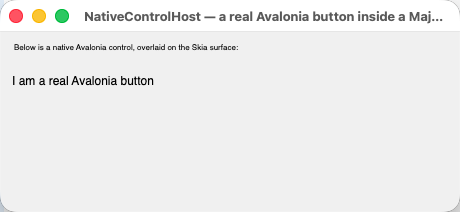
That code, running: the Avalonia Button is genuinely there, hosted above the Skia surface. Note it
renders as bare text with no button chrome — a hosted native control is styled by the host
application’s Avalonia styles, and the backend bootstraps a minimal Avalonia app that installs no
theme. The seam works; the styling is yours to supply. Budget for that if you plan to host real native
UI rather than a self-drawing surface like a map or video view.
Three things to know. Airspace limits: the overlay is a native element above your painted content,
so nothing the framework draws can appear on top of it (GTK 4 is the exception — it composites every
widget into one render tree, so there is no airspace problem there). Styling is not inherited from
Majorsilence.Forms — see the screenshot above. And assigning the wrong type fails silently —
NativeControl is typed Object, each backend type-checks it and simply returns if it doesn’t match;
nothing throws, nothing logs, nothing appears. An Avalonia Control handed to the Uno backend produces
exactly that; so does a WinForms control handed to GTK 4. If your native content is invisible, check the
type first: Avalonia Control, Uno UIElement, System.Windows.Forms.Control, Gtk.Widget.
Route B — video via frame callbacks (recommended)
Instead of hosting a native surface, take decoded frames from the player and draw them into Skia yourself. It composites properly with everything else you paint, and it sidesteps both the airspace problem and the handle problem entirely. The shape:
C#
public class VideoSurface : Control
{
    private SKBitmap? frame;

    // Called from your player's frame callback, on whatever thread it uses.
    public void OnFrameDecoded (SKBitmap decoded)
    {
        frame = decoded;
        Majorsilence.Forms.Application.RunOnUIThread (Invalidate);
    }

    protected override void OnPaint (PaintEventArgs e)
    {
        base.OnPaint (e);

        if (frame is not null)
            e.Canvas.DrawBitmap (frame, new SKRect (0, 0, Width, Height));
    }
}
VB.NET
Public Class VideoSurface
    Inherits Control

    Private frame As SKBitmap

    ' Called from your player's frame callback, on whatever thread it uses.
    Public Sub OnFrameDecoded(decoded As SKBitmap)
        frame = decoded
        Majorsilence.Forms.Application.RunOnUIThread(AddressOf Invalidate)
    End Sub

    Protected Overrides Sub OnPaint(e As PaintEventArgs)
        MyBase.OnPaint(e)

        If frame IsNot Nothing Then
            e.Canvas.DrawBitmap(frame, New SKRect(0, 0, Width, Height))
        End If
    End Sub
End Class
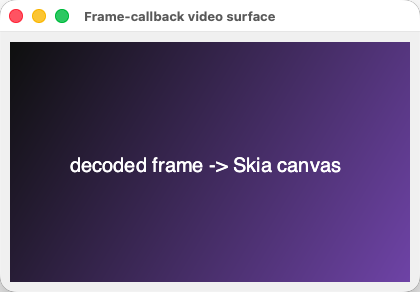
The same code with a synthesized frame standing in for a decoder. The bitmap is drawn straight into the control’s Skia canvas, so it composites with everything else you paint — no airspace, no handle, and it works identically on every backend including Headless (which is how you’d unit-test it).
See docs/native-interop.md for the full
comparison and the known gaps.
Exercise 9. Find every .Handle in your codebase and classify each use: forcing handle creation
(fine — keep it), passing to managed code (fine), or passing to native code (must change). A
five-minute grep that prevents a genuinely confusing class of bug.
Module 10 — Shipping: CI, versioning, staying current
Outcome: your pipeline catches the regressions this framework actually produces, and you know what to do when you hit a gap.
Gate your pipeline
| Gate | Command | Catches |
|---|---|---|
| Build clean | dotnet build --configuration Release |
Warnings before they compound |
| Tests | dotnet test --configuration Release --no-build |
Everything from module 8 — no display required |
| Migration drift | majorsilence-migrate <sln> --dry-run --strict |
A new unmapped reference the moment it lands on a branch, while you’re still converging |
| HiDPI | MF_HEADLESS_SCALE=2 on your scaling-sensitive tests |
Layout that only works at scale 1 — and a custom control that still scales its own canvas (module 4) |
| Blocking calls in browser code | The MFB001–MFB003 analyzer, with majorsilence_forms.browser_target = true in the shared UI library’s .editorconfig, and warnings as errors on that project |
A ShowDialog/MessageBox.Show/.Result/Thread.Sleep that will throw or freeze the page (module 6) |
| Browser boot | dotnet publish your wasm head + a headless-Chromium smoke test |
The wasm pipeline breaking |
That last one is worth stealing outright if you target the browser: building a wasm target is not
evidence it works. dotnet publish is what runs the wasm-tools pipeline (the emcc/wasm-opt native
link), and only a real boot in a browser proves the bundle. A dotnet build that succeeds tells you
nothing about it. The framework’s own CI does this with a ?check=<name> query string the gallery
head understands and a small Node script (samples/Gallery.Wasm/tools/modal-check.mjs) that boots the
published bundle in headless Chrome, runs each named check and compares the outcome to an expected
table — the modal checks are what proved the async-dialog rule. Copy the shape: a ?check= switch in
your own head costs an afternoon and turns “it published” into “it ran”.
Version discipline
- Pin your package version. This is beta software; the API is stabilizing. Pin, upgrade deliberately, and read the release notes — the breaking changes documented in module 5’s checklist are the kind of thing that lands between versions.
- Keep the core, backend and migrator versions in lockstep. The migrator’s
--package-versiondefaults to its own version, because the tool and the packages ship from the same release. -
Centralise the version so an upgrade is one edit. In
Directory.Packages.props:<Project> <PropertyGroup> <ManagePackageVersionsCentrally>true</ManagePackageVersionsCentrally> </PropertyGroup> <ItemGroup> <PackageVersion Include="Majorsilence.Forms" Version="26.9.0" /> <PackageVersion Include="Majorsilence.Forms.Avalonia" Version="26.9.0" /> <PackageVersion Include="Majorsilence.Forms.Headless" Version="26.9.0" /> </ItemGroup> </Project>Add
Majorsilence.Forms.Mvvm,.Theming.WinForms,.Animationor a second backend to the same list as you adopt them — every package in the family ships from the same release, at the same version. - Upgrade on a branch with your golden-image tests green before it reaches anyone else. Rendering changes are exactly what those tests are for.
When you hit a gap
You will. The useful thing to know is that several gaps in this framework were found only by migrating real applications — a WinForms game, a ribbon control library — not by reading the API surface. If your team ports something real and hits a silent no-op, that finding has value beyond your own project.
- A member that throws instead of no-opping contradicts the stub policy — report it as a bug.
- A silent no-op that cost you a day is worth an issue too: file it with the symptom, not just the
member name (“
Xdid nothing, so sprites drew with a white box”), because the symptom is what makes it findable for the next team. Attach the pinning test you wrote — it’s a reproduction, ready to run. - Blocked and can’t wait? The project takes pull requests, AI-assisted or not, with a simple bar:
dotnet build --configuration Releaseanddotnet testclean, new behavior covered by tests that prove it works rather than that it compiles, andCOMPATIBILITY_MATRIX.mdupdated alongside the code it describes. Closing the specific gap blocking you is usually far smaller work than designing around it.
Exercise 10. Add the gates above to your repository. Then take the one gap from module 3’s exercise that your app genuinely needs, and decide as a team: design around it, or close it upstream. Write down which and why.
Appendix A — Troubleshooting by symptom
| Symptom | Likely cause | Fix |
|---|---|---|
| App won’t start / no window appears | No backend package referenced — the core package can’t put a window on screen | Add Majorsilence.Forms.Avalonia (or Uno/Headless) |
Ambiguous-reference errors on Bitmap/Font/Pen after migrating |
System.Drawing.Common is still referenced beside the Majorsilence replacements |
Remove the package reference (the migrator does this for every project it touches) |
CS0104 (C#) / ambiguity (VB) on SystemColors / ColorTranslator |
Both live in System.Drawing.Primitives, so they still resolve through the kept System.Drawing import |
Add the alias — using SystemColors = Majorsilence.Forms.SystemColors; / Imports SystemColors = Majorsilence.Forms.SystemColors |
| A class library that never mentioned WinForms won’t compile | It had an image/font helper that got rewritten to Majorsilence.Forms.Drawing.* |
Add the Majorsilence.Forms reference; “projects the rewrite touches” is wider than “WinForms projects” |
Designer event wiring won’t compile (new EventHandler<KeyEventArgs>(…)) |
Event delegate types now match WinForms | Drop the wrapper, or name the WinForms delegate (KeyEventHandler, MouseEventHandler, …) |
e.X / e.Button missing in a Click handler |
Click is an EventArgs event in WinForms too |
Move to MouseClick; on a menu item, take the position from the owning control |
VB: Or vs | on Anchor/DockStyle flags |
Flag combination uses Or in VB |
AnchorStyles.Top Or AnchorStyles.Left |
| VB: tests run against no backend | VB has no module initializer — the C# <ModuleInitializer> pattern silently does nothing |
Install the backend from <AssemblyInitialize> / <SetUpFixture> — see module 8 |
| A split layout flipped orientation | SplitContainer.Orientation now means the direction of the bar |
Invert the value you set (nothing warns — both values compile) |
InvalidCastException on first resource read |
A generated resource designer casting a System.Resources.ResourceManager result |
Use Majorsilence.Forms.ComponentResourceManager (the migrator rewrites generated designers automatically) |
A resource resolves to null at runtime |
The resx entry is a ResXFileRef (linked file, not inline data) |
Inline the resource, or load it yourself |
| Every icon invisible, nothing logged | A relative asset path resolved against the wrong working directory; the missing file became a 1×1 placeholder instead of throwing | Resolve assets against AppContext.BaseDirectory — see module 0 |
| Icons missing in the browser build only | No real filesystem there; relative file loads can’t work | Ship images as embedded resources — see module 6 |
| A property set has no visible effect at all | It’s a stub per the stub policy — stores and reads back, nothing consumes it | Check the matrix row. If it throws instead, that’s a bug — report it |
| Hosted native content is invisible | The backend type-checked your native control, didn’t match, and returned silently | Check the type: Avalonia Control for the Avalonia backend, Uno UIElement for Uno, System.Windows.Forms.Control for the WinForms backend, Gtk.Widget for GTK 4 |
Maximize/minimize does nothing; Title is ignored |
You’re on a single-view platform (browser/Android/iOS/Terminal) — no window manager | Expected. See module 6 |
| Clicks land in the wrong place at HiDPI | Input routing mixing logical and device units — a framework bug in 26.0.30, since fixed and gated in CI at scale 2 | Upgrade (26.9.0 or later). If it persists, it’s your own code mixing the two spaces — see module 8 |
| A custom control draws at twice the size on a HiDPI display, fine at 1× | The paint canvas is logical now; the control still calls e.Graphics.ScaleTransform (e.Scaling, e.Scaling) and scales twice |
Remove the ScaleTransform — see module 4. Test under MF_HEADLESS_SCALE=2 |
Owner-drawn items (DrawItem, DrawNode, CellPainting) come out small or offset on HiDPI |
Those events are still in device pixels, unlike the control’s logical ClientRectangle |
Use e.Bounds and e.Graphics together and don’t mix in the control’s own logical geometry; see module 4 |
PlatformNotSupportedException from ShowDialog / MessageBox.Show in the browser, on Android or iOS |
Those rows can’t run a nested modal loop; the exception names the awaitable twin | Use ShowDialogAsync / MessageBox.ShowAsync from an async handler — see module 6. Turn on the MFB analyzer so the build finds the rest |
| The browser tab freezes after a click | Something blocked the page’s single thread — .Result, .Wait(), Thread.Sleep |
await it (MFB002/MFB003 flag these) — see module 6 |
A GTK 4 window ignores Location / StartPosition |
GTK 4 removed client-side positioning of top-level windows; the window manager decides | Expected. Location is a stored hint on that backend — see module 6 |
| File pickers return nothing on GTK 4 / Headless | Those backends have no native picker yet, so the framework’s own fallback dialog is used | Expected; the fallback works. Gtk.FileDialog wiring is deferred work |
| A WinForms dialog isn’t modal to its Majorsilence parent | OwnerHandleResolver was never wired |
Wire it once at startup — see module 7 |
| Deadlock or double message loop on Windows | Both Application.Runs were called |
One host per process; use the bridge for the other direction |
PlatformNotSupportedException from interop on macOS/Linux |
System.Windows.Forms doesn’t exist there |
Guard interop calls behind a Windows check |
| A CSS theme rule has no effect, no error | A control set that property in code (button.BackColor = …) — explicit per-control values win, as in WinForms |
Remove the per-control value, or accept it. A typo’d rule, by contrast, always errors — check ThemeStyleSheet.Parse diagnostics (appendix D) |
A BindCommanded button runs its command twice per click |
Button.Command is also set on the same control |
Use one or the other (appendix E) |
Appendix B — Rollout plan for a real codebase
A sequence that has the evidence arriving before the commitment does.
- Spike (1 day). Modules 0–3. Template app running on each developer’s OS, live gallery explored, compatibility matrix read. Deliverable: a list of your app’s top 20 UI dependencies scored implemented / stubbed / absent.
- Pilot migration (2–5 days). Pick a small, real, low-stakes internal app. Run the migrator on a branch, get it building, work the manual-fix checklist. Deliverable: a calibrated per-KLOC estimate and a list of gaps that actually block you.
- Decide the adoption shape. Four options, not mutually exclusive:
- New app — start on Majorsilence.Forms directly (module 2).
- New screens in an old app — Direction B interop on Windows, changing nothing you ship (module 7).
- One control at a time in an old app — the WinForms or WPF backend (module 7), which also works on .NET Framework 4.8, so the UI port needn’t wait for the runtime upgrade.
- Whole-app migration — the migrator, optionally with
--dual-buildif you’re on C# (module 5). VB teams: plan a cut-over instead — dual-build isn’t available to you.
- Establish the test net before the bulk work. Module 8, on the pilot: locator naming convention, headless tests in CI, golden images for the screens you care about. Do this before migrating the big app — the tests are how you’ll know the port behaves.
- Set the CI gates (module 10), including
--strictmigration drift. - Migrate in tranches, one deployable unit at a time, each ending green on the gates.
- Feed findings back (module 10). The silent no-ops you hit are the ones nobody else can find by reading the API.
Decide these explicitly and early, because each constrains the plan: which platforms you actually need
(desktop-only is a very different project from “and iOS”), whether you need a visual designer (there
isn’t one yet), whether you depend on a vendor control suite (Telerik has a compatibility layer; other
vendors need a --map file and manual work), whether you have an accessibility obligation outside
Windows, whether your codebase is VB (cut-over, not dual-build), whether anything in your app hosts
native content or reads window handles, and — if a browser or phone head is in scope — whether your
dialogs are written async from the start (module 6).
Appendix C — Reference card
Site pages: Getting started · Migration · Samples · Platform backends · Automation & UI testing · Native interop · FAQ · Blog · Live browser gallery
In the repository — the documents an application team actually needs:
| Document | Read it when |
|---|---|
COMPATIBILITY_MATRIX.md |
Before relying on any member. Keep it open |
MIGRATION.md |
Running the migrator; every breaking change is documented here |
docs/backends.md |
Choosing a backend; logical vs. device units; the single-view rows; the async-dialog rule and analyzer |
docs/theming.md |
Writing a CSS theme — the whole language is on that one page |
docs/mvvm.md |
Wiring view models with Observe/BindText/BindCommand |
docs/mobile-layout.md |
Laying out a phone-shaped screen — StackPanel, Card, RichListBox |
docs/animation.md |
RequestAnimationFrame, tweens, reduced motion, the Headless clock |
docs/automation.md |
Testing in depth, including custom controls’ IAutomationStateProvider and the MCP server |
docs/winforms-interop.md |
Running both stacks in one process on Windows |
docs/native-interop.md |
Hosting native content or video |
Commands worth memorising:
dotnet new install Majorsilence.Forms.Templates        # once
dotnet new majorsilenceforms -n MyApp                  # new app (shared library + desktop head)
dotnet run --project MyApp
dotnet build --configuration Release && dotnet test --configuration Release --no-build
MF_HEADLESS_SCALE=2 dotnet test --configuration Release --no-build   # the HiDPI gate
dotnet tool install -g Majorsilence.Forms.Migrator
majorsilence-migrate MySolution.sln --dry-run --diff   # scope a migration
majorsilence-migrate MySolution.sln --no-backup        # run it on a branch
majorsilence-migrate MySolution.sln --dry-run --strict # CI drift gate
dotnet tool install -g Majorsilence.Forms.Mcp          # let an AI agent drive the app (module 8)
dotnet workload install wasm-tools && dotnet publish <YourWasmHead> -c Release -o out
dotnet run --project samples/ThemeStudio               # from a clone: live CSS theme editor (appendix D)
The two-line summary for anyone who asks what changes: your imports move from
System.Windows.Forms to Majorsilence.Forms and from GDI+ to Majorsilence.Forms.Drawing, and you
add a backend package. Your forms, designer files, event handlers and business logic stay yours.
Appendix D — Theming your app with CSS
Outcome: you can restyle a whole application from one file, know what the theme language can and cannot express, and know how to find out when a rule is wrong.
Because the framework paints every pixel itself (module 1), appearance is a framework
concern rather than an OS one — and the framework exposes it as a small, strictly defined subset of
CSS. A theme is a .css file; the whole language fits on one page
(docs/theming.md), and the parser rejects anything
outside it with a line, a column and the supported alternative. There is deliberately no silent
no-op in this corner of the framework — a misspelt property is an error, not a stub. (This appendix
was checked against that document and the ThemeStudio sample, not run for this guide. The older
<Theme> XML format still works and can be mixed with CSS.)
Loading a theme
C#
using Majorsilence.Forms;

// Apply a file straight away:
Theme.LoadFromCssFile ("Themes/ocean.css");

// Or register by name and switch at runtime:
Theme.RegisterThemeCssFromFile ("Themes/ocean.css");   // returns "Ocean", from the file's @theme header
Theme.ApplyTheme ("Ocean");
Theme.SetBuiltInTheme (BuiltInTheme.Light);            // back to a built-in; resets everything

// Start your own from the current theme:
File.WriteAllText ("mine.css", Theme.ExportCss ("Mine", "Light"));
VB.NET
Imports Majorsilence.Forms

' Apply a file straight away:
Theme.LoadFromCssFile("Themes/ocean.css")

' Or register by name and switch at runtime:
Theme.RegisterThemeCssFromFile("Themes/ocean.css")     ' returns "Ocean", from the file's @theme header
Theme.ApplyTheme("Ocean")
Theme.SetBuiltInTheme(BuiltInTheme.Light)              ' back to a built-in; resets everything

' Start your own from the current theme:
File.WriteAllText("mine.css", Theme.ExportCss("Mine", "Light"))
Load the theme before the first form is shown if you want no flash; applying later repaints everything that is open.
The language, in one example
Three kinds of statement — a header, tokens and control rules — and nothing else:
/* Ocean: a deep blue-green dark theme. */
@theme "Ocean" extends Dark;             /* start from a built-in (Light, Dark, Classic, Aero, …) or any registered theme */

:root {
  --brand: #1e90ff;                      /* your own variable, referenced below with var() */

  --accent-color: var(--brand);          /* tokens: one per Theme property, kebab-cased */
  --background-color: #0a1929;
  --control-mid-color: #102a43;
  --foreground-color: #cfe8ff;
  --foreground-color-on-accent: white;
  --font-size: 14px;                     /* whole pixels only — pt/em/rem/% are errors */
  --ui-font: "Segoe UI", "Noto Sans", sans-serif;
}

/* A rule styles a control TYPE — every Button in the app that hasn't set its own colour in code. */
Button        { border: 1px solid #15395c; border-radius: 4px; box-shadow: 2px 2px #06101c; }
Button:hover  { background-color: var(--brand); color: white; }
Button:active { box-shadow: 0px 0px #06101c; }

TextBox, ComboBox, NumericUpDown { background-color: #061120; border-color: var(--border-low-color); }

/* Parts: pieces a control paints inside itself. */
DataGridView::header    { background-color: #2c2c30; color: #e8e8ea; font-weight: bold; }
DataGridView::selection { background-color: var(--accent-color); color: var(--foreground-color-on-accent); }
ScrollBar::thumb        { background-color: #55555c; border-radius: 4px; }
Menu::item:hover        { background-color: #34343a; }
What to tell your team about it, because each is a place CSS intuition misleads:
- Tokens first. Setting only
:roottokens already recolours every control and every part; add control rules only where the defaults aren’t what you want. - Selectors are control type names (
Button,TextBox,DataGridView, and every Telerik compat control). There are no classes, no ids, no descendant selectors and no*— a rule applies to every control of that type, wherever it sits. To style one control, setbutton.Style.BackgroundColor(or WinFormsBackColor) in code; explicit per-control values always win, exactly as in WinForms. - Four pseudo-classes (
:hover,:active,:disabled,:focus), and only on controls that repaint for that state — todayButton,LinkLabelandTrackBar.TextBox:hoveris an error with an explanation, not a silent nothing. - No cascade, no specificity, no
!important. Later declarations replace earlier ones. No@import, no@media— register two themes and pick one in code. - Layout is not themable. Colours, borders, radii (per corner), dashed borders, hard offset
box-shadowand fonts are;margin/paddingare errors — set them in code. - Hex alpha comes last (
#rrggbbaa), the opposite of the XML format’s#AARRGGBB.
Theme Studio, and letting an assistant write the theme
samples/ThemeStudio (in the repo, with prebuilt binaries attached to GitHub releases) is a live
editor: CSS on the left, every themable control on the right, the parser’s diagnostics underneath,
re-applied as you type — including to the Studio’s own window. Open a file and it is watched, so
you can edit it in your own editor or let a coding assistant edit it. Its Copy reference for AI
button puts the complete token/selector/property reference on the clipboard; paste that into a chat
with “a warm, high-contrast light theme with rounded buttons” and paste the answer back. If the parser
objects, paste the error text back to the assistant — every message names the offending text and the
alternative. --render-headless out.png theme.css renders the preview without a display and exits
non-zero on errors, which makes a theme file something CI can check. Six starting points ship in
samples/ThemeStudio/Themes/: light/dark (a matched pair), ocean, graphite, paper,
parchment.
Diagnostics from code
For a theme your users supply, parse it yourself and show the problems rather than applying blind:
C#
var sheet = ThemeStyleSheet.Parse (File.ReadAllText (path));

foreach (var d in sheet.Diagnostics)
    log.WriteLine ($"{d.Severity} ({d.Line}:{d.Column}): {d.Message}");
VB.NET
Dim sheet = ThemeStyleSheet.Parse(File.ReadAllText(path))

For Each d In sheet.Diagnostics
    log.WriteLine($"{d.Severity} ({d.Line}:{d.Column}): {d.Message}")
Next
One sheet, three toolkits
In a mixed migration app, the same file can also restyle the other half: Majorsilence.Forms.Theming.WinForms
applies it to real System.Windows.Forms controls (module 7) and
Majorsilence.Forms.Theming.Avalonia to native Avalonia Fluent controls (AvaloniaCssTheme.Apply /
Watch), each with a documented support matrix and every gap reported as a diagnostic. That is the
answer to “it will look like two apps stapled together” during a long migration.
Exercise D. Export the Light theme (Theme.ExportCss), change three tokens and one Button rule,
and load it at startup. Then deliberately write TextBox:hover { color: red; } and read the error the
parser gives you — it is the whole philosophy of this corner of the framework in one message.
Appendix E — MVVM helpers
Outcome: you can wire a view model to a form without reflection, in a way that is safe under trimming and NativeAOT, and you know when not to use it.
WinForms teams moving to a shared UI library often take the opportunity to separate view models from
forms. Control.DataBindings works here and is two-way — but it is reflective, which means rooting your
view-model properties for the trimmer. Majorsilence.Forms.Mvvm is the alternative: a small set of
extension methods over INotifyPropertyChanged and ICommand that name the property with nameof and
read and write it through lambdas, so nothing is looked up by string at run time. It has no toolkit
dependency and works with any view model, including one written with CommunityToolkit.Mvvm. (Checked
against docs/mvvm.md and the gallery’s
MvvmHelpersPanel, not run for this guide.)
The four helpers
C#
using Majorsilence.Forms.Mvvm;

var scope = new BindingScope ();                        // collects every subscription this page makes

// One-way: apply now, and again on every PropertyChanged for that property.
viewModel.Observe (nameof (CounterViewModel.Count), vm => vm.Count,
                   count => countLabel.Text = $"Count: {count}").AddTo (scope);

// Two-way: TextBox.Text <-> ProfileViewModel.Name (also BindChecked, BindSelectedIndex, BindValue).
nameBox.BindText (viewModel, nameof (ProfileViewModel.Name),
                  vm => vm.Name, (vm, value) => vm.Name = value).AddTo (scope);

// Commands: Enabled follows CanExecute; Click runs the command. Works on ANY control, custom-painted included.
incrementButton.BindCommand (viewModel.IncrementCommand).AddTo (scope);

// When the page is left:
scope.Dispose ();
VB.NET
Imports Majorsilence.Forms.Mvvm

Dim scope As New BindingScope()                          ' collects every subscription this page makes

' One-way: apply now, and again on every PropertyChanged for that property.
viewModel.Observe(NameOf(CounterViewModel.Count), Function(vm) vm.Count,
                  Sub(count) countLabel.Text = $"Count: {count}").AddTo(scope)

' Two-way: TextBox.Text <-> ProfileViewModel.Name (also BindChecked, BindSelectedIndex, BindValue).
nameBox.BindText(viewModel, NameOf(ProfileViewModel.Name),
                 Function(vm) vm.Name, Sub(vm, value) vm.Name = value).AddTo(scope)

' Commands: Enabled follows CanExecute; Click runs the command. Works on ANY control, custom-painted included.
incrementButton.BindCommand(viewModel.IncrementCommand).AddTo(scope)

' When the page is left:
scope.Dispose()
What the helpers guarantee — and the two rules
- Every push lands on the UI thread. A
PropertyChangedraised on a worker thread is posted through the dispatcher; one raised on the UI thread applies at once, so order is kept. If several changes queue, each push reads the current value when it runs, so a control never shows an older value after a newer one. - Two-way binding leaves the caret alone. The control is written only when its value differs, and while one direction is being applied the other is ignored, so the two can’t ping-pong. The consequence to know: if the view model rewrites what it is given (trimming, upper-casing), the box keeps what the user typed until the view model raises a change of its own.
BindCommanddisables the control while an async command reports it cannot run — which CommunityToolkit’sAsyncRelayCommanddoes by default — with no extra code.- Rule 1: don’t combine
BindCommandwithButton.Commandon the same control. Both would run the command, so it runs twice per click. Use one or the other. - Rule 2: dispose the scope when the page goes away.
BindingScopedisposes everything it holds, latest first, so no view leaks a handler onto a view model that outlives it. APropertyChangedwith anull/empty name means “everything changed” and refreshes every observation.
Two-way covers four controls today: TextBox, CheckBox, ComboBox (selected index) and
NumericUpDown (clamped to its range, as the control itself does). Anything else — a TrackBar, a
DateTimePicker, a radio group — is Observe in one direction plus the control’s own event in the
other, or DataBindings.
Testing the wiring without a UI thread
The helpers take an optional IUiDispatcher (CheckAccess() + Post(Action)). The default asks the
active backend whether you’re on the UI thread and posts through Application.RunOnUIThread. In a test,
pass a fake that reports “not on the UI thread” and queues what it’s given — then your test can prove
a background change was marshalled, and run the queue when it chooses. That is a stronger test than
anything a reflective binding lets you write.
Exercise E. Take one form from your pilot migration with a hand-written view-model wiring (events
in, property sets out) and replace it with Observe/BindText/BindCommand in a BindingScope. Count
the lines you deleted; then write one test with a fake dispatcher that proves a worker-thread change
reaches the label.