WinForms on Linux
Why plain WinForms can’t do it
System.Windows.Forms ships only in the Windows Desktop runtime. On Linux there is no
Microsoft.WindowsDesktop.App shared framework to resolve against, so a net10.0-windows project
doesn’t merely fail to run — dotnet build refuses it. The assembly is a wrapper over user32.dll
and GDI+, and neither exists here.
The three things people usually try:
- Mono’s
System.Windows.Forms. A real reimplementation, and the reason old forum threads say this works. It was built for the .NET Framework era, was never carried into modern .NET, and is not a target you can adopt today. - Wine. Runs the Windows binary rather than porting it. Workable as a stopgap; it means shipping a Windows executable plus a compatibility runtime, with approximate host integration.
System.Drawing.Commonon Linux. Even for non-UI drawing code this stopped being an option: it has thrownPlatformNotSupportedExceptionoff Windows since .NET 7 unless you set a now-removed compatibility switch.
What Majorsilence.Forms does instead
It reimplements the WinForms API on top of SkiaSharp and hosts it in a window that a backend provides. On Linux you have three hosts to pick from, all from the same application code:
- Avalonia (the default) — a normal X11 application: a real window in your window manager, real input, GPU compositing where available. Runs under XWayland on Wayland sessions.
- GTK 4 (
Majorsilence.Forms.Gtk4) — a realGtk.Windowthrough the gir.core bindings, native on Wayland and X11. Selected explicitly; details below. - Terminal (
Majorsilence.Forms.Terminal) — the form drawn in a terminal emulator, no display server needed; details below.
Whichever you choose it is a plain net10.0 (or net8.0) build with no -windows suffix anywhere.
dotnet new install Majorsilence.Forms.Templates
dotnet new majorsilenceforms
dotnet run --project MajorsilenceFormsApp
That is the whole setup on a stock Ubuntu box with the .NET SDK installed. The template produces a shared UI library plus a desktop head on the Avalonia backend; the same source builds and runs unchanged on Windows and macOS.
What actually works on Linux
| Area | On Linux |
|---|---|
| Windowing, input, HiDPI | Native. The Avalonia backend uses X11 (XWayland on a Wayland session). The GTK 4 backend is native Wayland/X11 — verified on Wayland — but uses GTK’s integer scale factor, so 1.25×/1.5× displays render at 1× and let the compositor upscale for now |
| Rendering | SkiaSharp, GPU-accelerated — the same paint code as Windows and macOS, so controls look identical |
| Fonts and text | SkiaSharp resolves system fonts through fontconfig; Majorsilence.Forms.Drawing.Common also bundles a fallback set, so text renders even on a minimal image with no fonts installed |
GDI+ / System.Drawing code |
Replaced by Majorsilence.Forms.Drawing — Bitmap, Font, Pen, Brush, Region, Drawing2D, Imaging, and EMF/WMF playback |
| Common dialogs | OpenFileDialog, SaveFileDialog, FolderBrowserDialog, ColorDialog, FontDialog work through the Avalonia backend’s native dialogs. On GTK 4 the native file pickers aren’t wired yet, so the framework’s own fallback dialogs appear instead |
| Printing | PrintDocument renders through Skia to PDF rather than to a print driver — the same on every OS |
| WebView controls | Real WebKitGTK on both desktop backends — through Avalonia.Controls.WebView on Avalonia, and WebKitGTK 6.0 directly on GTK 4 (libwebkitgtk-6.0 must be installed; IsWebViewFunctional tells you) |
| Sound | Played through the OS utility (paplay/aplay) |
| Secure storage and speech | Majorsilence.Forms.Essentials: SecureStorage uses the Secret Service via secret-tool (a missing keyring daemon or libsecret-tools means IsSupported is false, never a plaintext fallback); Speech uses espeak/espeak-ng |
| Themes | CSS theme files work the same here as everywhere; BuiltInTheme.Default follows the OS light/dark preference |
| Native window handle | A real X11 XID via WindowBase.PlatformHandle on Avalonia (per-control handles are IntPtr.Zero everywhere — see Native interop). On GTK 4, NativeControlHost overlays a real Gtk.Widget inside your form with no airspace problem, because GTK 4 composites everything into one render tree |
| UI Automation / screen readers | Still Windows-only (Majorsilence.Forms.WindowsUIAutomation); an AT-SPI bridge is roadmap, not wired. The browser build does expose an ARIA DOM mirror to screen readers. The backend-neutral automation tree drives tests, Selenium and the MCP server on Linux regardless |
Majorsilence.Forms.WindowsFormsInterop, .WinForms, .Wpf |
Windows-only by definition — they host real System.Windows.Forms/WPF windows, which don’t exist here |
The GTK 4 backend
If you want a real GTK window rather than an Avalonia one — for a GNOME desktop, for native Wayland,
or because you already have a Gtk.Application to embed into — reference the GTK 4 backend and
select it before Application.Run:
dotnet add package Majorsilence.Forms
dotnet add package Majorsilence.Forms.Gtk4
using Majorsilence.Forms;
using Majorsilence.Forms.Gtk4;

Gtk4Application.Use ();                 // installs the GTK 4 backend (Avalonia is the default otherwise)
Application.Run (new MainForm ());      // GLib main loop
The machine needs GTK 4 itself: libgtk-4-1 on Debian/Ubuntu, gtk4 on Fedora/Arch. For
WebBrowser and the webview-backed compat controls, add WebKitGTK 6.0 (libwebkitgtk-6.0-4 on
Debian/Ubuntu, webkitgtk6.0 on Fedora, webkitgtk on Arch). Embedding works in both directions —
myControl.ToGtkWidget () / myForm.ToGtkWindow () put Majorsilence.Forms content inside an
existing GTK app, and ShowDialog gets a genuine transient-for, modal window.
Known limits, mostly GTK 4 API removals rather than pending work: Form.Location is a hint the
window manager may ignore (GTK 4 dropped client-side positioning), SetIcon(byte[]) is a no-op
(GTK 4 icons are themed names), file pickers fall back to the framework’s own dialogs, scaling is
integer-only, and the backend is not AOT-analysed. Full list in the
GTK 4 backend docs.
The Terminal backend
Majorsilence.Forms.Terminal runs the same form inside a terminal emulator — anywhere a terminal
is, including tmux/screen or an SSH session, with no display server. The form is rendered by the
normal Skia pipeline and shown as Kitty graphics or Sixel at the terminal’s real pixel resolution
where the terminal supports them, or as Unicode block glyphs (2×4 sub-pixels per cell) everywhere
else; mode and 24-bit colour are discovered by querying the terminal, and
MF_TERMINAL_GRAPHICS=halfblock|kitty|sixel pins one. Mouse and keyboard work, the Kitty keyboard
protocol is used where offered, and Ctrl+C always exits.
It is a single-view host, like a phone: the form fills the terminal with no title bar. It has been
verified in xterm and WezTerm; kitty, Ghostty, foot, iTerm2 and Windows Terminal are not
yet exercised. Native file pickers, NativeControlHost and web views have no terminal equivalent.
See samples/Gallery.Terminal and the
Terminal README.
Deployment notes
Nothing exotic — it’s an ordinary .NET application:
dotnet publish -c Release -r linux-x64 --self-contained
Three things worth knowing:
- Native Skia binary.
SkiaSharp.NativeAssets.LinuxcarrieslibSkiaSharp.so, which links against fontconfig. Desktop distributions already have it; slim container images generally needlibfontconfig1(Debian/Ubuntu) orfontconfig(Fedora/Alpine) added explicitly. - GTK runtime (GTK 4 backend only). Your installer or package must depend on
libgtk-4-1(Debian/Ubuntu) orgtk4(Fedora/Arch), pluslibwebkitgtk-6.0-4/webkitgtk6.0if you useWebBrowser. The Avalonia backend has no such dependency. - Headless environments. For CI, servers and containers with no display, reference
Majorsilence.Forms.Headlessinstead of a desktop backend and render offscreen — no Xvfb, no display server. That’s how this project’s own test suite runs. See Automation & UI testing.
Verified on Linux
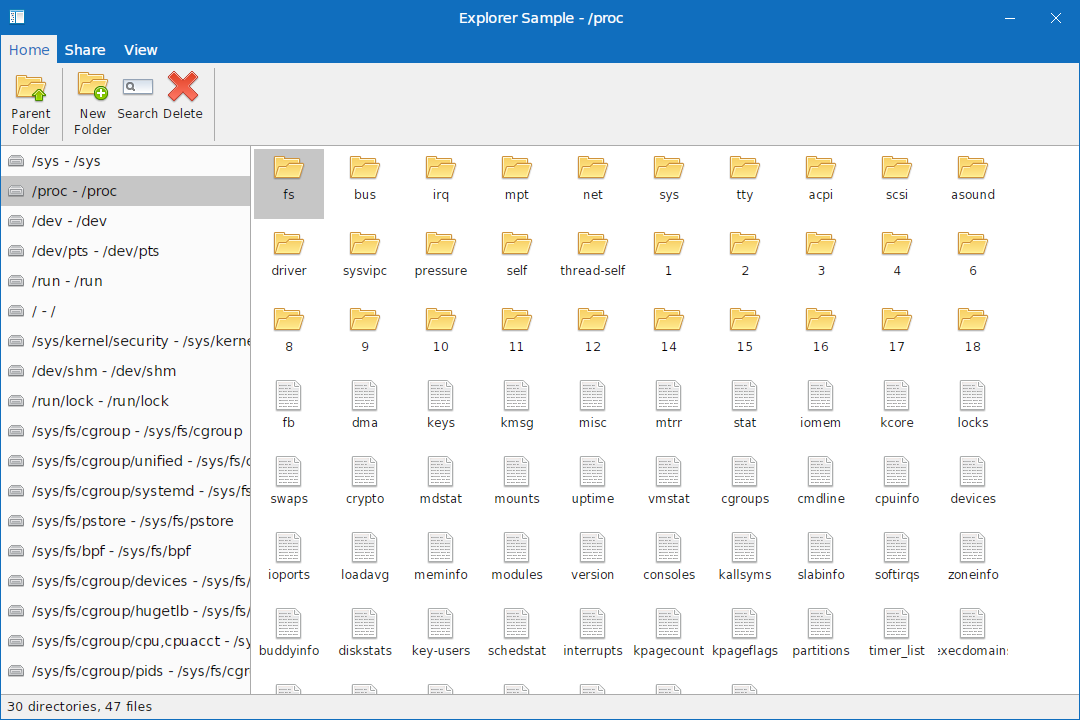
The Explorer sample — a Windows Explorer clone — runs on
Ubuntu, the full control gallery runs on the Avalonia backend
there, Gallery.Gtk4 has been verified rendering, handling input and loading WebKitGTK on Wayland,
and Gallery.Terminal has been run in xterm and WezTerm:
Next
- Getting started — first app, from a template or scratch.
- Migrate an existing WinForms app — the automated rewrite,
including dropping the
-windowsTFM and theSystem.Drawing.Commonreference. - Platform backends — Avalonia, GTK 4, Terminal and the rest.
- WinForms on macOS — the same story on Apple hardware.
- Cross-platform WinForms — the architecture and its trade-offs.